

About Domain Lineage
Domain Lineage provides a business-level view of how data flows between organizational domains, auto-derived from glossary term assignments.
Domain Lineage is a business-level view of your lineage graph. Instead of tables, views, and fields, the graph shows domains as nodes with their assigned glossary terms as child items, and term-to-term relationships as edges between domains. This perspective is aimed at data stewards, CDOs, and business stakeholders who need to trace how data flows between organizational areas without navigating technical asset-level detail.
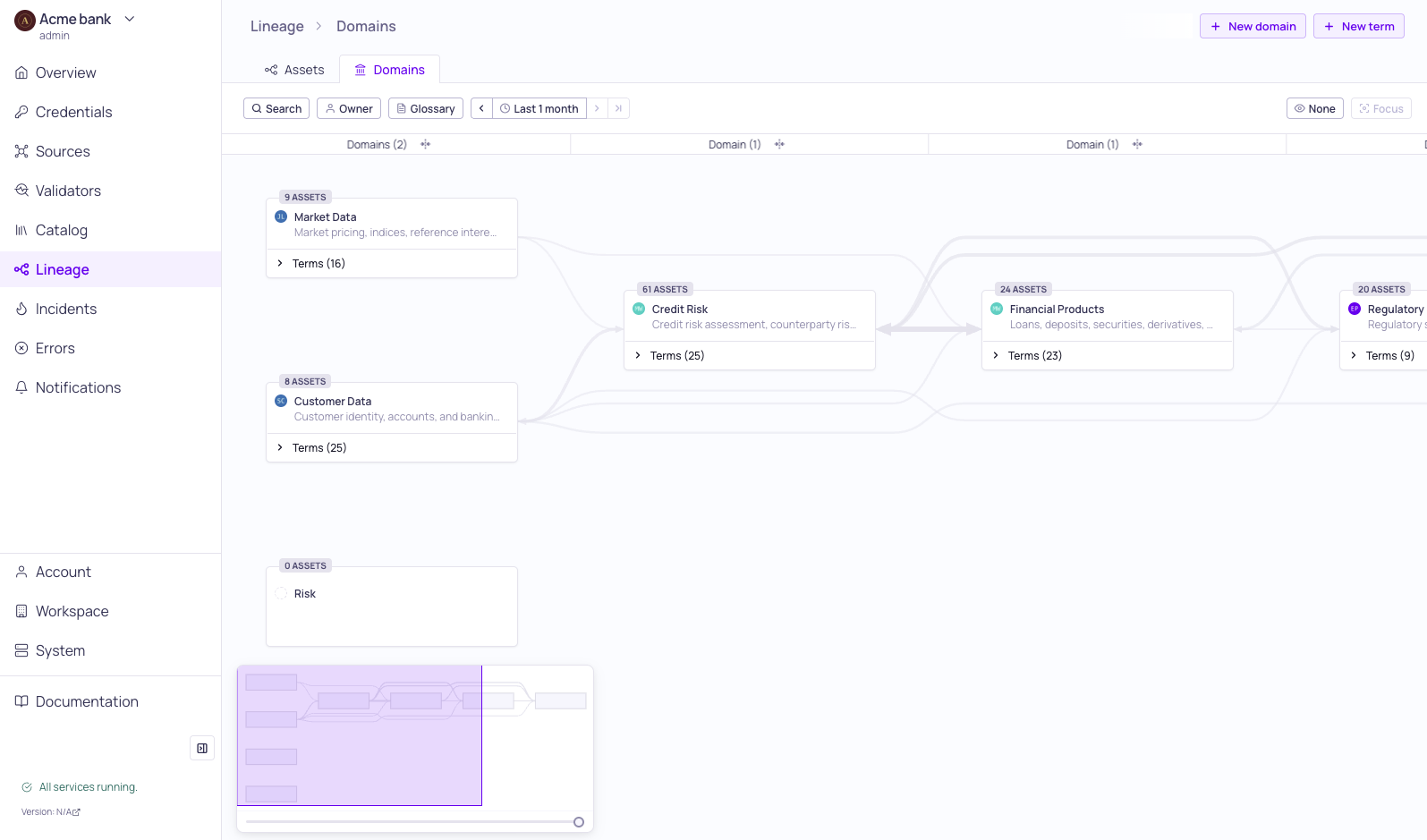
Domain lineage graph
Domain Lineage is the second tab on the Lineage page, alongside the existing Asset Lineage view. Both tabs render the same underlying data from different perspectives:
| Graph Items | Asset Lineage | Domain Lineage |
|---|---|---|
| Node | Catalog asset | Domain |
| Child items in the node | Schema fields | Glossary terms |
| Edges | Asset-to-asset and field-to-field lineage | Domain-to-domain and term-to-term relationships |
| Anchor | Anchor required to load the graph | No anchor — the full domain graph loads immediately |
How Domain Lineage Is Derived
Domain Lineage is computed automatically from metadata you are already maintaining. No new configuration is required — if you have assigned glossary terms with domains to your catalog assets or schema fields, a domain graph is available.
The derivation rules are:
- Domain nodes are created from the domains assigned to glossary terms that are linked to catalog assets or schema fields.
- Terms inside a domain node are the glossary terms assigned to assets or fields that belong to that domain (via the term's domain property).
- Edges between domains are created whenever a lineage edge connects two assets that carry glossary terms from different domains.
- Term-to-term links inside a domain-to-domain edge are derived from the glossary terms on the connected assets and fields at each end.
Because derivation is fully automated, coverage of the domain graph grows as you expand glossary term assignments. Domain lineage updates as soon as the underlying glossary terms or lineage relationships change.
Domain Nodes
Each node in the Domain Lineage graph represents a domain. Nodes display:
- Header — Domain icon, domain name, and asset count badge.
- Owner avatar — The domain owner, when one is assigned.
- Glossary terms — A foldable list of terms in the domain. Each term row shows the term name and the term owner's avatar (when assigned). Expand the node to see all terms; collapse to see a compact summary.
Edges
Edges connect two domains when their assets or fields participate in a lineage relationship. An edge displays:
- Term-to-term links — Individual lines between specific glossary terms at each end of the edge, showing which business concepts connect the two domains.
- Bidirectional arrows — Shown when assets in one domain flow to the other and vice versa. Domain-level and term-level arrow directions are rendered independently.
Overlays
The Domain Lineage graph supports overlays that apply to the selected time range in the page toolbar:
- Data quality overlay — Aggregates the data quality of sources within each domain onto the domain node. Helps you identify which business areas have data quality issues.
- Incidents overlay — Shows color-coded indicators on domain nodes based on the severity of incidents raised on sources within the domain, with a count of affected incidents.
Only one overlay is active at a time. Adjust the time range in the page toolbar to narrow the overlay to a specific period.
Related Resources
Updated 5 months ago