

IBM Db2
Connect Validio to IBM Db2 to monitor and validate your operational data.
IBM Db2 is a relational database management system for enterprise-level data warehouse management, analytics, and transactional workloads. Db2 uses SQL for database updating and retrieval. Integrate Validio with your Db2 database to monitor, analyze, and validate your data assets.
To integrate with IBM Db2,
- Create a service account in Db2 with the appropriate permissions for Validio. See Prerequisites.
- Create a Validio credential to connect to the service account. See Add an IBM Db2 Credential.
- Create a Validio source to monitor the tables in the Db2 database. See Add an IBM Db2 Source.
Prerequisites
Create a service account in Db2 with the appropriate permissions for Validio to read and validate your data. For more information about credentials in Validio, see Credentials.
Credential Permission Requirements
Validio Credentials require
VIEWERaccess rights when connecting to sources to read and access data. Admins must ensure that they do not provideEDITORaccess rights to their credentials.
The following SQL script provides steps for setting up a user with the necessary permissions for the source in Validio. Copy the script into a SQL worksheet and follow the steps:
-- Create a role.
CREATE ROLE VALIDIO_ROLE;
GRANT ROLE VALIDIO_ROLE TO USER validio_user;

-- Grant access to connect to the database server.
GRANT CONNECT ON DATABASE TO ROLE VALIDIO_ROLE;

-- Grant read access to the following system tables.
-- These permissions are required for Validio catalog functionality.
GRANT SELECTIN ON SCHEMA SYSIBM TO ROLE VALIDIO_ROLE;
GRANT SELECTIN ON SCHEMA SYSCAT TO ROLE VALIDIO_ROLE;

-- For data monitoring and profiling, grant read access to the schemas
-- containing any relevant tables and views.
GRANT SELECTIN ON SCHEMA <myschema> TO ROLE VALIDIO_ROLE;
Add an IBM Db2 Credential
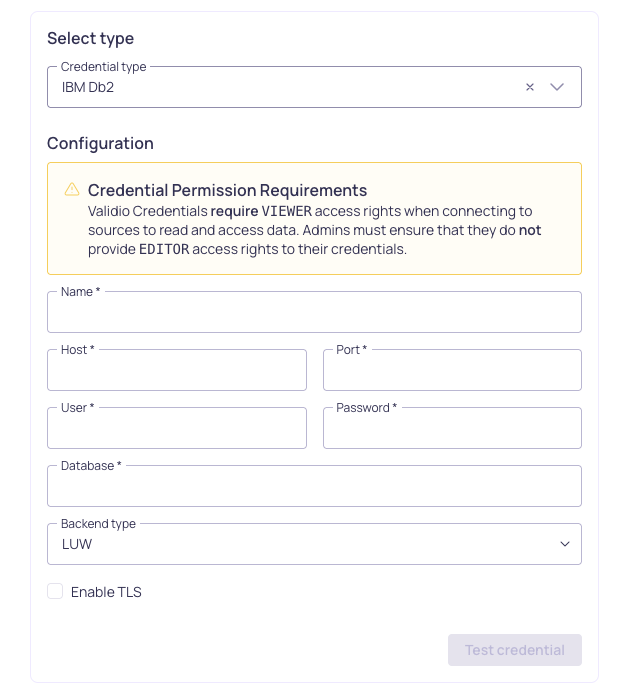
Configuration for a Db2 credential
To add a credential for IBM Db2,
- Navigate to Credentials and click + New credential.
- Under Namespace, select a namespace where the resources will be created.
- For Credential Type, select IBM Db2 Credential.
- Fill in the credential parameter fields. Refer to the IBM Db2 Credential Parameters table.
- Check Use for catalog and schema checks to automatically discover credentials and add them to the catalog page.
- Click Create.
Validio will validate the connection to the Db2 account. If validation passes, Validio will automatically start fetching data. If validation fails, check that you provided the correct parameter values and try again.
Once the credential is created, you can add a source to monitor Db2 data.
IBM Db2 Credential Parameters
| Parameter | Description |
|---|---|
| Name | Identifier for the credential, referenced when configuring a source. |
| Host | DNS hostname or IP address of the Db2 database server. |
| Port | Port number of the Db2 database server. |
| User | Username of the Db2 account with read access to the desired table. |
| Password | Password of the specified Db2 account. |
| Database | Name of the default Db2 database where the table to read is included. |
| Backend type | Select LUW (Linux, UNIX, Windows) or z/OS (IBM Z mainframes). |
| Enable TLS | (Optional) Check to enable encryption between Validio and the Db2 server. |
| PEM certificate bundle | When TLS is enabled, paste or upload a PEM certificate file. |
Add an IBM Db2 Source
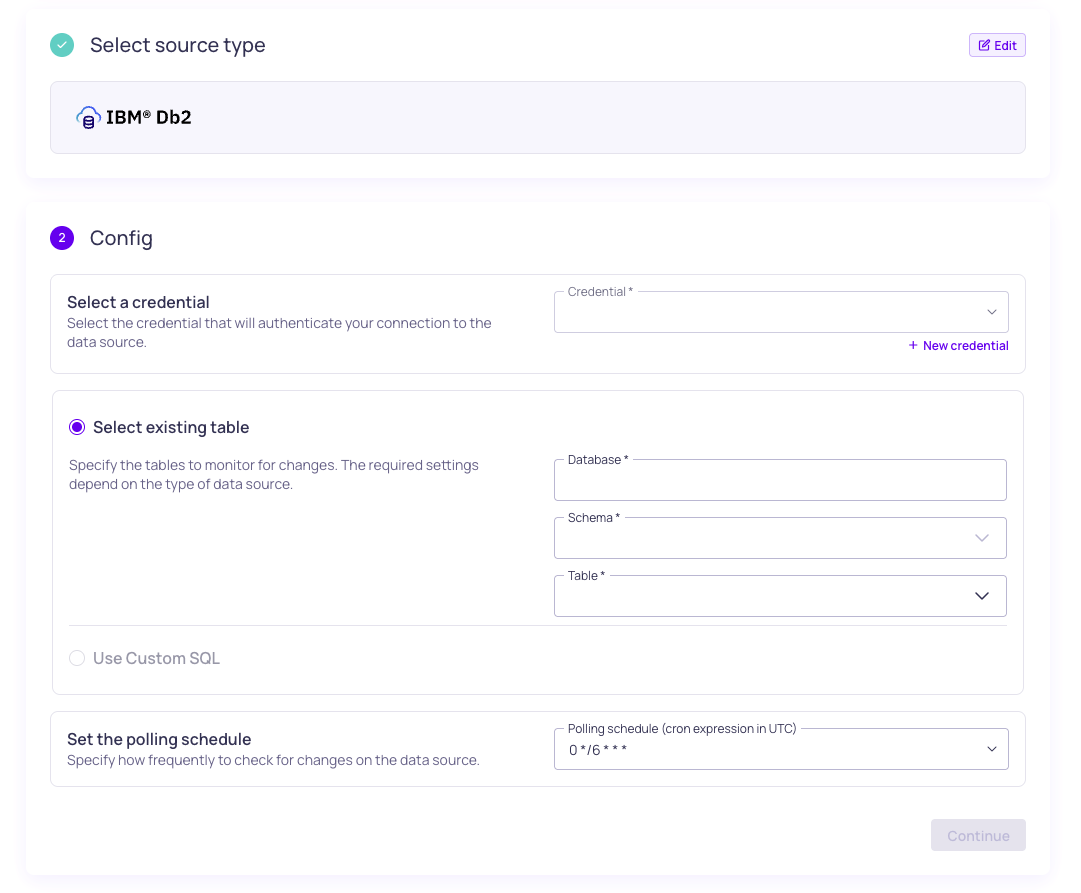
Configuration for a Db2 source
To add a source for IBM Db2,
- Navigate to Sources and click + New source.
- Under Source type, select IBM Db2.
- Under Config,
- Select the valid Credential or create a new credential to authenticate your connection to the data warehouse.
- You have two options for specifying the dataset and tables to monitor:
- Select an existing table -- Enter the Database, Schema, and Table to specify where the data comes from. Selecting more than one table will create a new source for each table. Refer to the Source Configuration Parameters table.
- Use Custom SQL -- Write a valid SQL query to specify the tables to monitor.
- Set the Polling schedule, which is how frequently the validators on the source will check for changes.
- Under Schema, click Continue to automatically infer the schema fields from the tables you selected. If you select many tables, this operation can take a few minutes to complete.
- Under Source details,
- Add Tags to help group related sources or to use for routing notifications.
- Add an Owner who will be the contact for incident notifications.
- Assign a Priority, which indicates the importance of incidents detected on this source.
- Click Continue to create the source.
Source names are generated automatically and will be displayed when the source creation completes. If there are more than 5 sources, you will see the names for the first five and a count of the remaining sources.
IBM Db2 Source Configuration Parameters
| Parameter | Description |
|---|---|
| Credential | IBM Db2 credential. |
| Database | Name of the Db2 database. |
| Schema | Name of the schema that contains the table. |
| Table | Name of the table to read data from. |
Updated 3 months ago