

Overview: Summaries of what changed
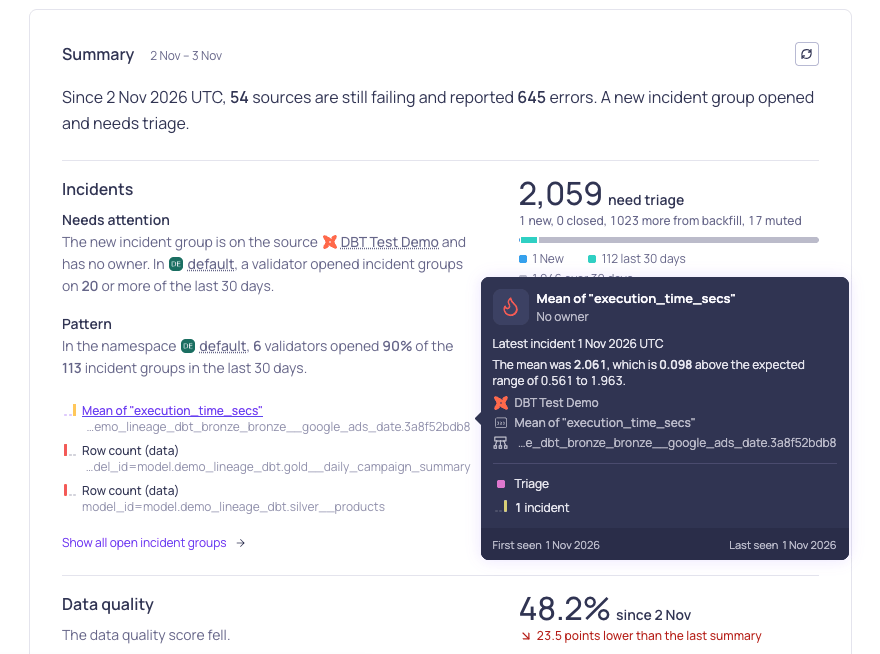
The Summary card on the Overview page
Overview: One graph for data quality and time to resolve
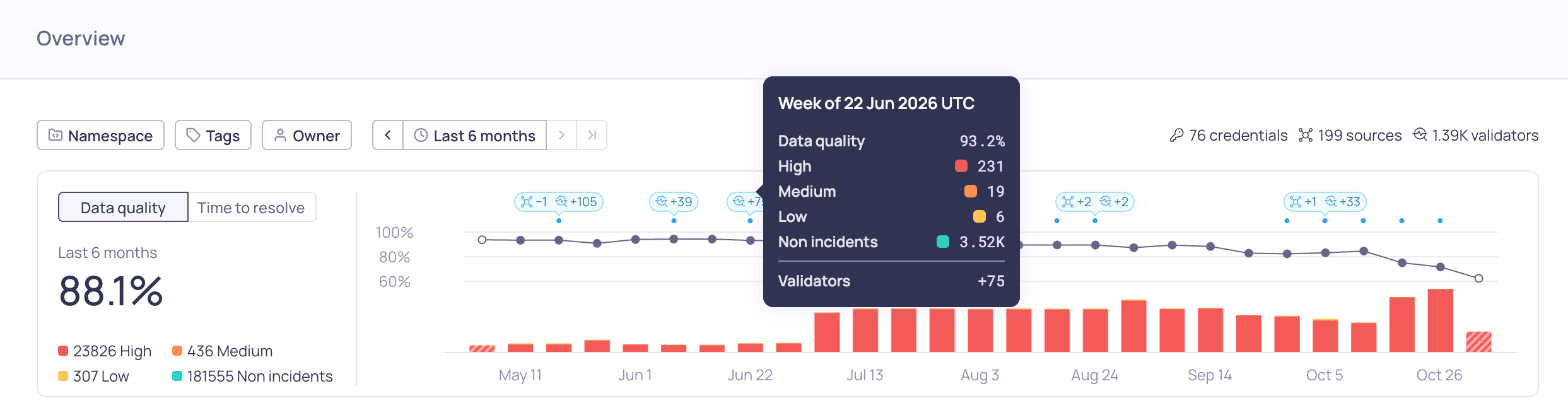
The combined graph in Data quality mode
Release notes: Available in-app
After an upgrade to a new minor version, a New in Validio card at the bottom of the side navigation shows what the release brings. Click See what’s new to read the release notes in Validio, with each patch release collapsed under its version and date. Once you’ve opened or dismissed the card, a What’s new link next to the version number takes you back to the notes.Validio reads the release notes from the Validio docs site. In a VPC deployment, allow your network to reach the docs site. See VPC Communication. If Validio can’t reach the docs site, the card links to the release notes there instead.5 November 2026
New features
- AI assistants connected through the Validio MCP Server can now update validators and sources, change an incident group’s status and owner, and add or edit comments on incident groups (UI-8706, UI-8707)
- Search for a validator type when you create a validator (UI-9022)
Improvements
- MCP tools now return clear errors for invalid requests, so AI assistants can correct them and try again (UI-8333)
- Creating a source with a credential of a different type now returns an input error instead of a server error (UI-9104)
- Incident notifications in Slack, Microsoft Teams, and email show the time in the 24-hour format, show a fixed threshold as its limit and operator, such as
≥ 5, and link to a graph that ends no later than the current time. Slack no longer turns segment names that look like domains into links (VR-6006) - Setting an incident group to the status it already has no longer adds activity entries or posts replies to its Slack, Microsoft Teams, and Jira threads (VR-6047)
Fixed issues
- Data quality scores are now correct for days a validator was rerun (VR-5995)
- Debug queries and Not an anomaly now work on incidents that a validator rerun created (VR-6031)
- A segment’s data quality score now counts only active incidents, matching the validator’s score (UI-8383)
- Incident updates keep reaching notification channels when two channels have a message with the same ID, such as two Jira sites that share a project key (VR-6010)
- The Overview activity log and its CSV export now show changes to domains and classifications, including archiving and restoring them (UI-8802)
- The activity log now shows the catalog approval workflow setting by name, instead of its field name (UI-9186)
- Glossary term activity is no longer listed twice (VR-6035)
- Revising a validator draft keeps Initialize using historic data off when its author turned it off (UI-9047)
- AI-suggested debug queries no longer fail when they use a reserved word, such as
CURRENT, as a CTE name (UI-8977) - AI assistants connected through the Validio MCP Server can read a domain’s data quality again (UI-9039)
- The Overview activity panel now shows only the activity in the namespaces selected in the Namespace filter (UI-9158)
- Debug queries with accented letters, such as
'Café', now return the matching rows when you run them without editing them first (UI-9166) - Threshold filters now accept decimal values, such as
0.7(UI-9148) - SAP IQ lineage now includes the statements that procedures run as dynamic SQL with
execute immediate, when the query log records them as batches (VR-6076) - With catalog approval workflows on, proposing a lineage edge between two fields no longer publishes the edge between their assets before the proposal is approved, and discarding the proposal removes it (VR-6071)
- Updating a tag through the API now returns an error when the tag comes from dbt or OpenLineage, or when the change would duplicate another tag (VR-6073)
- In Chrome and Edge, a page’s URL now updates as soon as the page sets its filters or view, so a saved view that fails to load no longer stays active (UI-8692)
- A glossary term’s list of fields no longer times out on large catalogs, including with catalog approval workflows on (UI-9193, UI-9197)
- When a source has timestamp fields but no tumbling window, the validator warning now recommends a tumbling window for time-series data and a global window for dimensional tables (UI-9192)
Removals
- These deprecated fields are removed from the public API:
Mutation.sourcesOwnerUpdate(deprecated in 10.2.0, useownerUpdate),OracleCredentialConfig.database(deprecated in 8.2.0, useservice),ValidatorStats.lastArtifactAt(deprecated in 5.0.0, uselatestWindow), andnamespaceIdandresourceNameonResourceNamespaceUpdatedResult, which repeated the input (UI-8972)