

Glossary Term Propagation
Automatically spread glossary term assignments to connected assets and fields via data lineage.
Glossary term propagation spreads term assignments from one asset or field to connected assets and fields via lineage edges. This enables you to assign a term once at the source and have it flow automatically to all downstream (or upstream) consumers, reducing manual curation effort.
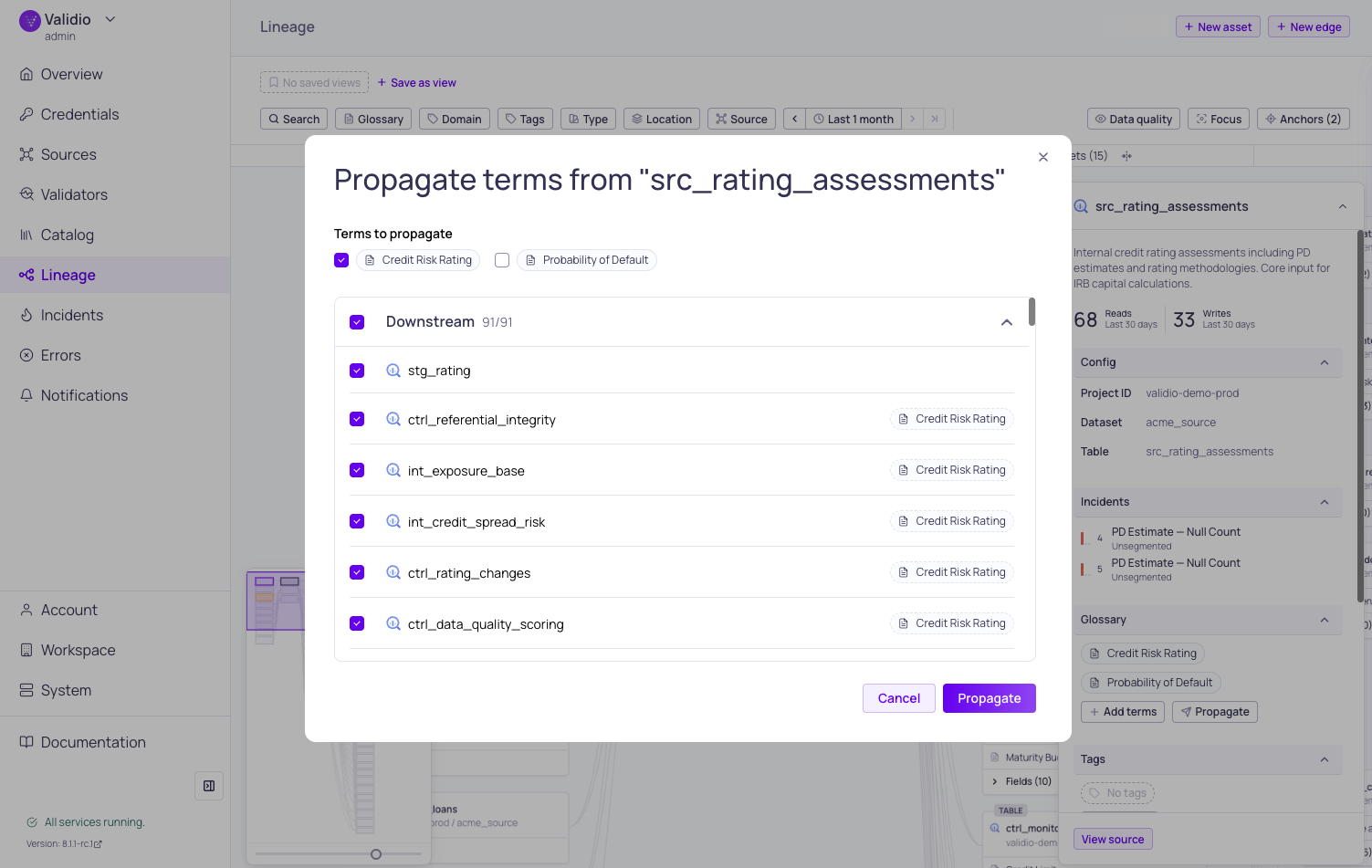
Propagation dialog in Lineage
How Propagation Works
Propagation uses the lineage graph to identify assets and fields that are connected to the selected entity. When you propagate terms from a node or field, the system follows lineage as far as it connects in the chosen direction — not just the immediate neighbors — and assigns the same terms to every target it reaches.
Propagated assignments are tracked separately from direct assignments. Each propagated assignment records its origin, so you can trace where a term came from.
Propagate Terms from Lineage
-
Select a node or field in the lineage graph that has glossary terms assigned to open the sidebar.
-
Click Propagate in the Glossary section of the sidebar.
The Propagate button is only enabled when the selected entity has at least one direct term assignment. An asset or field whose only terms arrived through propagation cannot start a new propagation run, and the disabled button reads "Add glossary terms to propagate". To continue a chain from there, promote one of its propagated terms first. For more information, see Choose Direct or Propagated.
-
In the Propagation terms dialog, review:
- Terms to propagate -- Each assigned term is listed with a checkbox. Uncheck any terms you do not want to propagate.
- Target assets and fields -- Targets are grouped by direction (upstream and downstream). Each target shows its name, path, and whether it already has the term assigned. Review the direction carefully — propagating upstream shares context with data producers, while propagating downstream shares it with consumers.
-
Click Propagate to apply the assignments.
Propagation Preview Dialog
The propagation preview shows exactly what will happen before you confirm:
- Target groups -- Organized by upstream and downstream direction.
- Target items -- Each item shows the asset or field name, its location, and whether the term is already assigned. Use checkboxes to include or exclude individual targets.
- Summary -- A count of how many targets will receive new term assignments.
- Partial preview warning -- On very large lineage graphs, the preview covers up to 10,000 connected targets and shows a Showing a partial preview banner to indicate that some reachable fields or tables may be missing. To cover the rest, propagate the terms in stages: apply the preview you have, then propagate again from an asset or field at the far edge of the range you just covered.
Direct vs. Propagated Assignments
Every glossary term assignment is either direct (assigned by a user) or propagated (created by a propagation run). The platform uses these labels consistently: term chips are styled differently depending on which kind they are, and the Assignment type filter on a term's Assignments tab lets you narrow either list to one kind.
| Assignment Type | Visual Style | Description |
|---|---|---|
| Direct | Standard term chip | Assigned directly by a user. |
| Propagated | Plain-variant chip | Assigned via lineage propagation. Tooltip shows "Propagated". |
Choose Direct or Propagated
The two kinds of assignment answer different questions, so the choice is about what you want the assignment to mean.
A propagated assignment is provisional and derived. It states that a business concept reaches this data through lineage, and it costs nothing to create across hundreds of targets at once. It stays tied to the assignment it came from: change or remove the origin, and the propagated copies follow. Use propagation to discover and display where a concept flows.
A direct assignment is committed and independent. It states that a curator decided this term belongs on this asset or field. It survives changes at the origin, it can be managed on the target itself, and it is what the platform counts as governed coverage of the term. Use direct assignments to record decisions you want to keep.
| If you want to | Use |
|---|---|
| See where a business concept flows, without committing to each hit | Propagated -- review the run and leave the rest in place |
| Record that a term genuinely applies to an asset or field | Direct -- promote it, or assign the term directly |
| Have the assignment count toward the term's data quality coverage | Direct |
| Propagate onward from an asset or field the term reached | Direct -- promote it there first |
| Remove the assignment on the target itself | Direct |
| Keep assignments in step with a single source of truth at the origin | Propagated -- remove or change the origin and the copies follow |
What Depends on the Assignment Type
Four behaviors treat direct and propagated assignments differently:
- Data quality coverage -- The Data quality tab, its per-dimension cards, and the data quality dots on the glossary list roll up the term's direct assignments only. Propagated assignments show where a term reaches, but they do not move the dots, so a term's coverage does not change after a propagation run until you promote the assignments you are keeping. For more information, see Business Glossary.
- Upstream terms -- The Upstream terms tab traces lineage from the term's direct field assignments. A term whose only links are propagated has no starting point, so the tab has nothing to show.
- Propagating onward -- Propagate requires at least one direct term on the selected asset or field, so a propagation run cannot be chained from a propagated assignment. Promote it first.
- Removing the assignment -- A propagated assignment is owned by its origin and can only be removed there. Unassign from term skips propagated rows. Promote the assignment if you need to manage it on the target itself. For more information, see Removing Propagated Assignments.
Promote a Propagated Assignment
Promoting converts a propagated assignment into a direct one. The term stays the same — only the way the assignment is held changes. This matters because a propagated assignment depends on the assignment it originated from: if that origin assignment is removed, the propagated copies go with it. A promoted assignment stands on its own and survives.
Promotion is typically the last step after a propagation run: propagate the term across lineage, review what it reached, then promote the assignments you want to keep permanently. Promoting requires the glossary: WRITE permission.
Assigning the term directly where it is already propagated — through the assignment popover or the glossary column in a list — has the same effect as promoting it. The existing propagated assignment is converted in place rather than duplicated, so you never end up with two assignments of the same term on one target.
Promote a Single Assignment
Hover over a propagated term chip anywhere in the platform and click Promote to direct in the tooltip. The action appears only for propagated assignments.
Promote Assignments in Bulk
A propagation run across a wide table can produce dozens of assignments to review. You can promote them together instead of one at a time:
- Navigate to the term's details page and open the Assignments tab.
- On either the catalog assets list or the schema fields list, set the Assignment type filter to Propagated.
- Select the rows you want using the checkboxes.
- Click Promote to direct in the selection toolbar.
A confirmation reports how many assignments were promoted, and the list refreshes to show them as direct.
The catalog assets list and the schema fields list have their own filter and their own selection toolbar, so assets and fields are promoted separately.
If your selection mixes direct and propagated rows, both toolbar actions still work and each applies only to the rows it can act on: Promote to direct promotes the propagated rows, and Unassign from term removes the direct ones. Promote to direct is disabled only when nothing in the selection is propagated, in which case its tooltip reads "Only propagated assignments can be promoted to direct."
Removing Propagated Assignments
When you remove a direct term assignment from an asset or field, any propagated assignments that originated from it are also automatically removed. This ensures that propagation stays consistent — if the source assignment no longer exists, its downstream (or upstream) propagated copies are cleaned up.
Assignments that you have promoted to direct are not affected by this cleanup, because they no longer depend on the assignment they came from.
Related Resources
Updated about 1 month ago