

About Custom SQL Sources
Use Custom SQL Sources in Validio to create CTEs, join tables, and assess cross-asset dependencies without changing underlying data.
Custom SQL sources let you define the dataset to monitor by writing SQL queries directly in the source configuration. Use them to create Common Table Expressions (CTEs) inside Validio for joining tables, assessing cross-asset dependencies, and preprocessing data — without changing your underlying tables or expanding warehouse permissions.
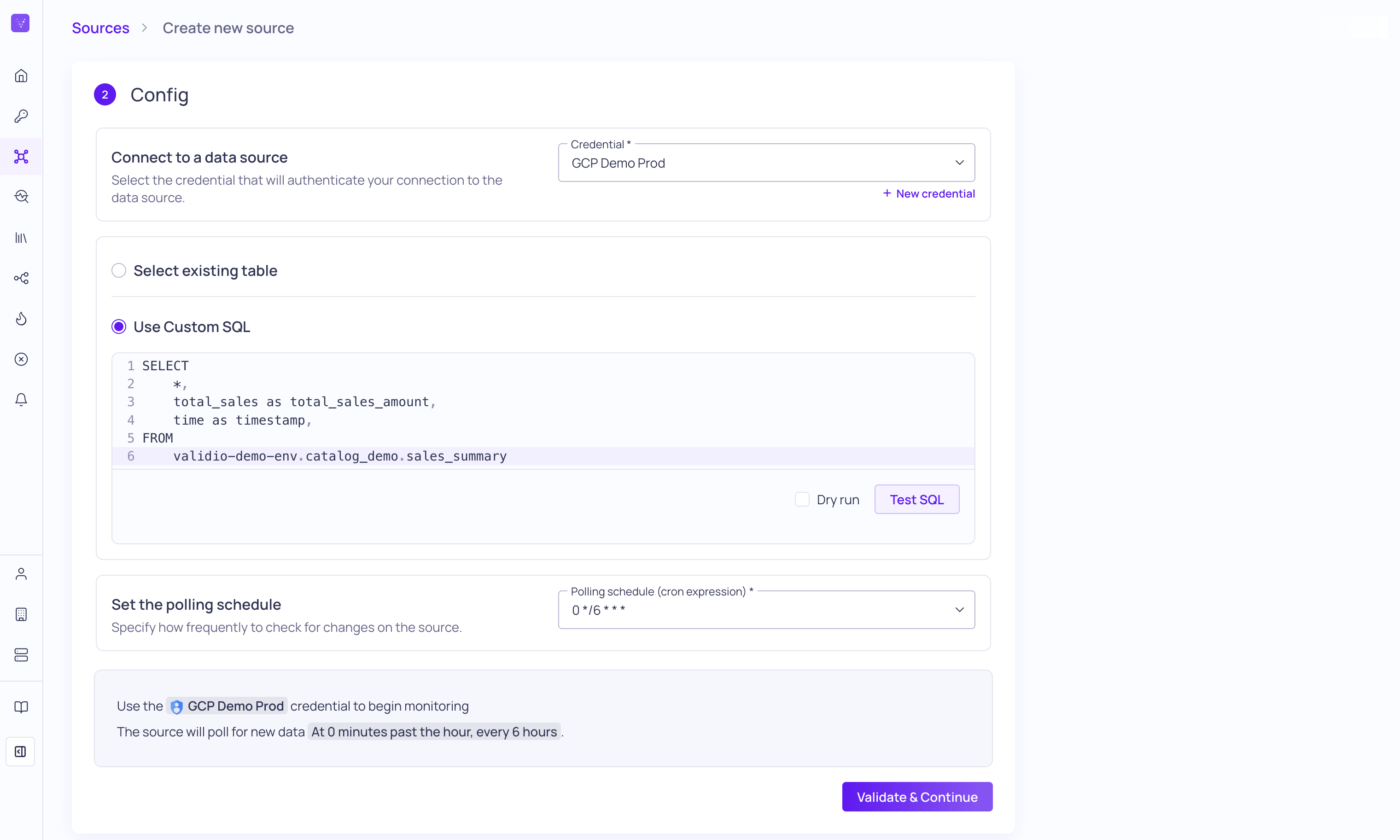
Use Custom SQL to configure the data source
For SQL-based sources such as data warehouses and query engines, you can configure the dataset to monitor by writing custom SQL queries directly in the source configuration. These custom SQL sources behave like any other source in Validio — supporting dimension mapping, root cause analysis, and the full library of out-of-the-box validators — while also expanding the scope of your data monitoring.
Choosing Between a SQL Source and a Custom SQL Validator
Validio's extensive library of out-of-the-box validators covers most data quality rules. When you need to go beyond them, you have two options that can be used independently or together:
- Custom SQL Source: reshape, join, or enrich the data so an out-of-the-box validator applies. The validator logic stays standard; only the dataset definition is custom.
- Custom SQL Validator: keep the source as-is and define a bespoke metric calculation in SQL. Use this when the metric itself isn't expressible as an out-of-the-box validator.
| Need | Custom SQL Source | Custom SQL Validator |
|---|---|---|
| Join two or more tables before validating | ✓ | |
| Filter or transform a column to fit an existing segmentation | ✓ | |
| Compare row counts or values across two assets | ✓ | ✓ Use when the comparison logic is the metric |
| Convert a numeric column into categorical groups (for example, age buckets) | ✓ | |
| Compute an exponentially weighted moving average | ✓ | |
| Express a custom ratio or business-specific metric | ✓ |
Whenever a Custom SQL Source can do the job, prefer it — out-of-the-box validators come with richer root cause analysis workflows than Custom SQL Validators do. Both kinds of validator get a generated debug query that you can save and reuse across incidents, but a Custom SQL Validator's wraps your own metric query rather than reading the source table directly, so it returns the rows behind that query rather than the raw records.
Query Syntax
The query for a custom SQL source is plain SQL, written in the dialect of the warehouse the source connects to. Its result set defines the dataset Validio monitors: every column the query returns becomes a field on the source.
Template functions do not apply here
Functions such as
validio_window_id,validio_window_filter, andvalidio_source_tablebelong to Custom SQL validators, not to source queries. A source query is ordinary SQL with no Validio placeholders in it.
What the Query Must Return
The query can return any result set. The columns it returns, and the types Validio infers for them, become the source schema.
When you create a source, schema inference is a separate step in the wizard: the column list is fixed at that point, and re-inferred whenever you edit the query afterwards. Downstream configuration addresses those columns by name rather than the columns of the underlying tables, so name them deliberately — segmentations, filters, and validators all reference the fields the query returns.
Timestamp Column for Tumbling Windows
If the source will carry a tumbling window, the query must return a timestamp column for the window to use as its Data-time field. The field is configured on the window rather than on the source, so a query that returns no timestamp column can still back a global window, which evaluates on clock-time instead.
Previewing the Query
Select Preview to run the query and return sample rows before you commit to it. Previewing is optional — schema inference does not depend on it — but it is the quickest way to confirm the query returns what you expect. For how preview data is handled, see Data Handling and Retention.
Using a Validator on a Custom SQL Source
When you add a Custom SQL validator to a custom SQL source, the source query is added to the validator query as a CTE at runtime. The validator must therefore use {{ validio_source_table() }} as its table identifier instead of naming a table directly, so that it reads from that CTE. For more information, see Source Table.
Out-of-the-box validators need no such handling — they read the source's fields exactly as they would for any other source.
Warehouse-Specific Requirements
Snowflake credentials must have an active warehouse for custom SQL to be available. If the credential or its service user has no warehouse, update it before configuring a custom SQL source. See Snowflake.
Supported Source Types
The following data sources support using custom SQL. For other sources, see About Sources.
Use Cases for Custom SQL Sources
The following are some use cases for why you would choose to configure your sources with custom SQL.
Assessing Cross-Asset Dependencies
A cross-asset dependency check evaluates data quality across two or more assets — for example, parity between a source and target table, referential integrity between fact and dimension tables, or row-count reconciliation across a transformation. By defining a custom SQL source that joins the relevant assets, you can express the dependency once and apply any out-of-the-box validator to the result.
For end-to-end examples, see Custom SQL Validator Recipes.
Creating Data Diff Views
Custom SQL sources are well suited for comparing two datasets — for example, before and after a transformation, source against target, or a snapshot against the current state. Define the diff in SQL once, and monitor it with any out-of-the-box validator to catch unexpected changes.
Preprocessing Data Before Validation
Use a custom SQL source to reshape data so that it fits an out-of-the-box validator, instead of relying on a Custom SQL Validator to handle every transformation inline. Preprocessing in the source layer keeps validator logic standard and unlocks Validio's full debug query and root cause analysis support.
- Reused Shared SQL Code -- You may find yourself replicating the same logic across multiple custom SQL validators. If that is the case, you can isolate that code in a custom SQL source. These can include code for casting strings to timestamps repeatedly, as well as more complicated logic transformation logic. An added benefit of moving this shared logic to custom SQL sources is that you might be able to take advantage of out-of-the-box validators, leading to improved debug queries and RCA workflows.
- Dynamic Segment Creation -- You might have a column that you want to compute further aggregations on. For example, you can convert numeric ages into a categorical dimension of age groups; or take a date and break it down into individual components of year, month, and day. Doing this will then allow you to take advantage of all of our downstream segmentation functionality for these dynamically created categorical dimensions.
- Precomputing Segment Frequencies -- For more intricate segment filtering, you can precompute segment frequencies or counts as part of a custom SQL source and then use these frequencies for filtering within Validio.
Fact and Dimension Table Architectures
In many cases you are monitoring a fact table but need to include information about particular dimensions. To support these use cases, you can create a SQL source to JOIN a fact and dimension table and then group rows by a dimension attribute. Then, you can configure a validator to monitor anomalies in that grouping.
Monitoring Unstructured Data
Custom SQL sources are a great place to utilize LLMs in your warehouse for validating unstructured data. For example, take advantage of Snowflake Cortex, Google BigQuery's Gemini or Databricks AI Functions to validate misspelled or inconsistent naming for data in a column. Read more in our blog post, "Bringing data quality to unstructured data with LLMs and Custom SQL".
Creating "Views" within Validio
Custom SQL sources behave like views, but live entirely inside Validio. You don't need create-view permissions in your warehouse, you don't need to ask a platform team to update an ETL job, and the view's lifecycle stays attached to the validator that depends on it. Use them when you'd benefit from a view but can't — or don't want to — create one in the underlying system.
Updated 2 months ago