

OpenAI
Configure an OpenAI credential in Validio to leverage GPT models for validator recommendations and generating SQL queries in custom validators and filters.
OpenAI provides advanced AI language models, including the GPT family of models for text generation, analysis, and conversation. By adding an OpenAI credential to Validio, you can leverage these capabilities to generate validator recommendations for monitoring and SQL queries for custom validation and filtering.
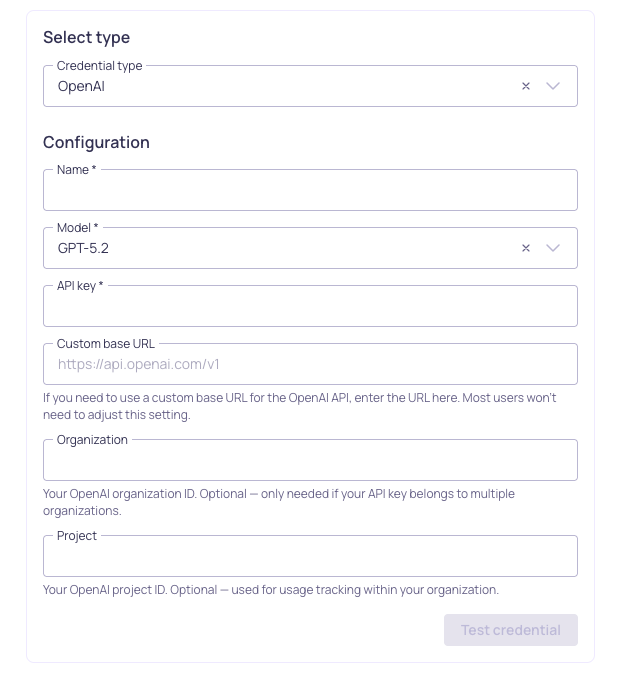
Configuration for OpenAI credential
Prerequisites
Before setting up your OpenAI credential, ensure you have:
- Enabled the Allow LLM credentials setting in your Validio Workspace. See Configuring Global Settings.
- Appropriate permissions to create credentials (requires
credentials:WRITEpermissions for the Namespace). See Managing Roles. - An active OpenAI account and an OpenAI API key (you can generate one from the OpenAI Platform)
Add an OpenAI Credential
Because each OpenAI credential is tied to one language model, you should add an OpenAI credential for each model you want to use in Validio.
To add an OpenAI credential,
-
Navigate to Credentials and click + New credential.
-
Namespace: Select the namespace where the resources will be created.
-
Credential Type: Select OpenAI from the dropdown.
-
Configuration: Complete the required parameters.
Parameter Description Name A unique identifier for this credential. Model Select from available OpenAI models (such as GPT-5, GPT-4.1) or, if the desired model is not in the list, enter the model ID. Refer to Models overview in OpenAI documentation. API key Your OpenAI API key from the OpenAI Platform. The valid API key starts with sk-Custom base URL (Optional) Custom base URL for the OpenAI API. Only needed if using a proxy or custom endpoint. Organization (Optional) Your OpenAI organization ID. Only needed if your API key belongs to multiple organizations. Project (Optional) Your OpenAI project ID, used for usage tracking within your organization.
-
(Optional) Click Test credential to validate that Validio can successfully connect to OpenAI using your configuration. If the test fails, verify your API key is correct.
-
Click Create credential to save your configuration.
Next Steps
With your OpenAI credential configured, you can leverage GPT models across various Validio features:
- Custom SQL validators: Generate complex validation queries or fix errors in your SQL queries.
- SQL filters: Create sophisticated filtering conditions and data selection criteria.
- Validator recommendations: Profile your data and generate recommendations to quickly set up monitoring
Updated 3 months ago