

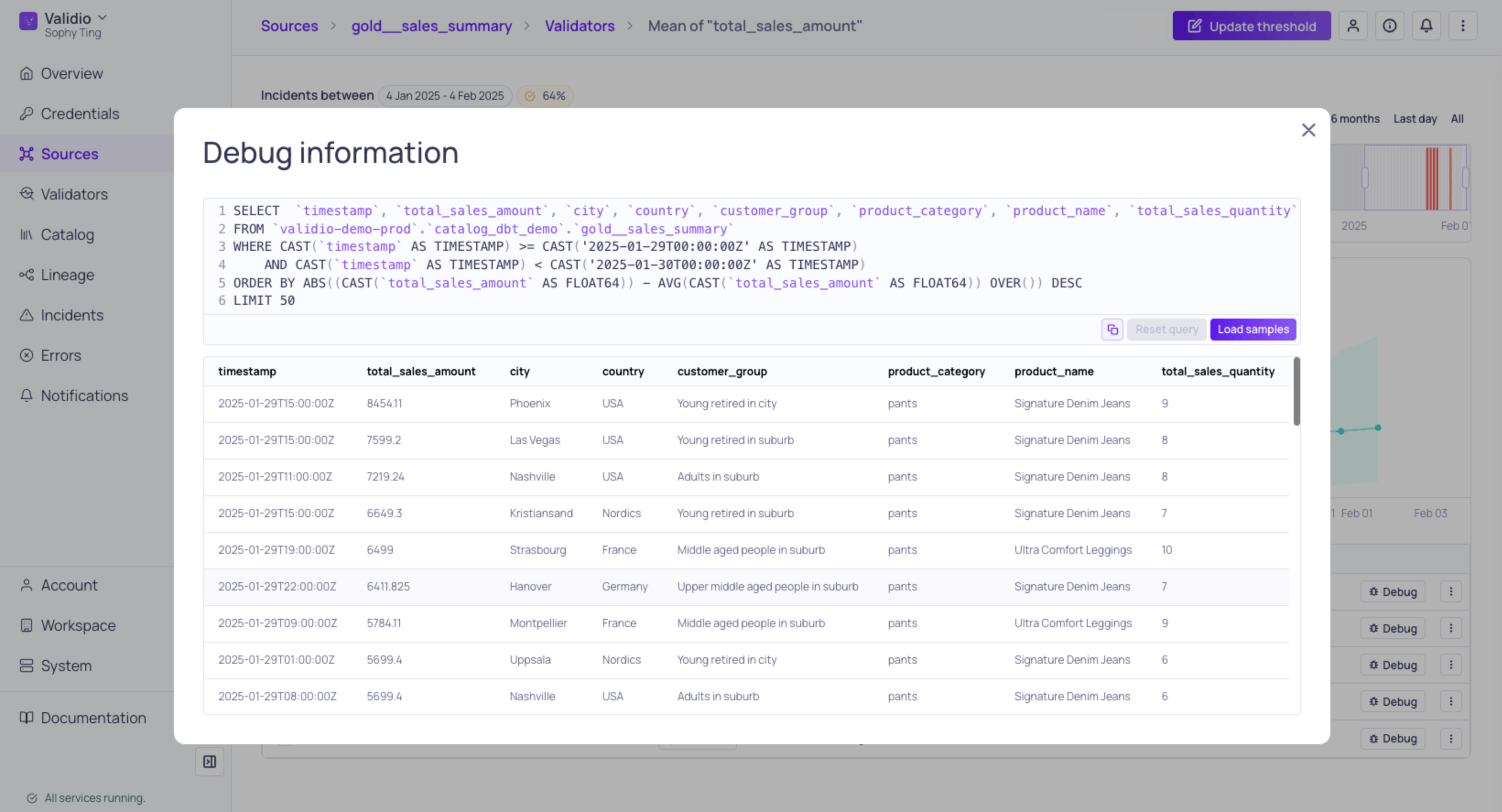
Debug Information for a Data Warehouse Source
Prerequisites for debug
To use the Debug feature, ensure the following requirements are met:- Source type: Debug is available for data warehouse and query engine sources where Validio uses SQL pushdown for validation.
- Permissions: Your role must have the following permissions in the namespace. See Managing Roles.
How debug works
The Debug feature is available where individual incidents are listed, such as in a details page for incident groups, and provides:- Automatically generated SQL: Validio generates a SQL query that reproduces the data quality incidents. The query,
- Filters data down to the specific Window and Segment where the incident occurred. It does this using placeholders — the time range and segment appear as
{{ validio_... }}rather than as fixed values, and Validio fills them in when the query runs. See Debug Query Syntax. - Orders records based on how far away they are from being allowed, returning the most prominent outliers at the top.
- Filters data down to the specific Window and Segment where the incident occurred. It does this using placeholders — the time range and segment appear as
Troubleshooting OutliersAlthough outliers are not the only cause of incidents, they are a good starting point for troubleshooting.
- Sample data generation: Use Run for Validio to automatically generate sample rows from the detected incidents to help you troubleshoot.
- Query customization: Modify the generated query to explore different aspects of the problem. The query actions sit above the editor. If needed, Reset removes your edits and returns to the original generated SQL.
- Copy support: Copy the query to run in your preferred database tools for deeper analysis.
- Reusable queries: Save a query you want to run again, and pick it up on any future incident for the same validator. See Saving and Reusing a Debug Query.
- AI-suggested queries: Select Suggest query to have an agent write an investigation query from the incident’s context, arriving as an unsaved draft you can edit, run, save, or discard. See Debug Query Suggestions.
Saving and reusing a debug query
A saved debug query belongs to the validator, not to the incident you saved it from. Once saved, it is available on every incident for that validator, to anyone withvalidators:READ in the namespace.
To save a query:
- Open Debug on an incident and edit the SQL until it returns what you need.
- Select Save and give the query a name.
- Open Debug on any incident for the same validator.
- Choose the query from the Queries picker above the editor.
- Select Run. Any placeholders bind to the incident you are currently viewing.