

- Assets — The technical lineage graph with catalog assets, fields, and field-level edges. Primary workspace for data engineers. See About the Lineage Graph and Using Lineage.
- Domains — The business-level lineage graph with domains and glossary terms. Auto-derived from glossary term assignments, with no configuration required. Primary workspace for data stewards, CDOs, and business stakeholders. See About Domain Lineage and Using Domain Lineage.
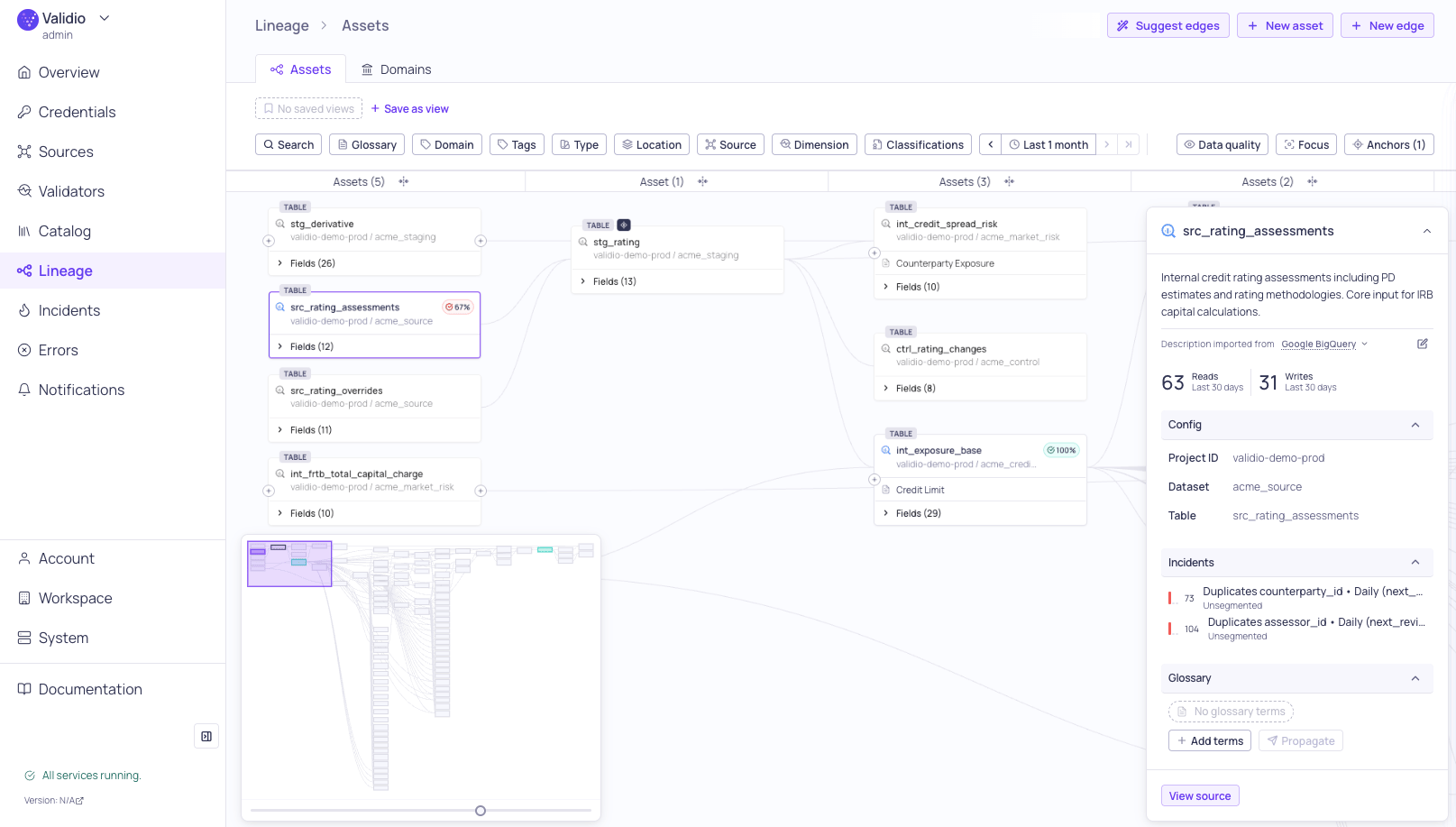
Lineage page with graph
- Asset and field-level lineage — Visualize relationships at both the dataset and individual field level.
- Progressive exploration — Start from anchor points and expand connections on demand. The graph loads a portion of the lineage initially and fetches additional connections as you expand nodes, so large lineages remain navigable.
- Glossary term integration — View and manage business glossary terms directly on lineage nodes and fields.
- Data quality overlays — See incident severity indicators on nodes to quickly identify quality issues.
- Impact analysis — Overlay incidents on the graph to trace how issues propagate downstream, complementing root cause analysis for upstream tracing.
- Saved searches — Save anchor and filter combinations to revisit lineage views. See Customizing and Saving Views.
- Focus mode — Isolate lineage paths connected to a selected node or field.
How lineage is generated
Validio automatically infers lineage from the data sources you add. This process includes generating the catalog assets and deriving the relationships between datasets and fields. To generate the catalog assets, Validio reads from the Information Schema, or equivalent metadata. Then, Validio combines information from query logs and (if provided) dbt Manifest files to map the lineage relationships.- For data warehouse and query engine sources, the lineage process is automated after you complete the set up of a credential for either source type.
- For transactional database sources, lineage is also supported, but some databases require additional setup on the database or on the credential before Validio can read their query history. Refer to the integration page for your database, for example Oracle or SAP IQ.
- For other source types, such as object storage and data streams, catalog assets are only added after you add new sources.
- You can manually define new lineage relationships between datasets and fields. For more information, see Using Lineage.
- This means that a delay of maximum 24 hours can occur from when a new relationship is created until it is visible inside Validio.
- To ensure that lineage relationships between table assets are up-to-date, Validio disregards SQL queries older than 30 days.
dbt Manifest JSON fileCurrently, you have to use the Validio CLI to upload the dbt Manifest JSON file. For more information, see Validio CLI.