

Key Concepts
The concepts below are grouped by the workflow you follow in Validio — from setting up monitoring, to investigating issues, to alerting your team, and to understanding your data landscape.Monitoring & validation
Monitoring and validation is how you connect Validio to your data and define what healthy data looks like.- Credentials are used to access and authenticate to your data source systems. One set of credentials can be reused to set up multiple Sources. For more information, see Credentials.
- The Catalog discovers and organizes all of your data assets in one place, surfacing utilization and quality signals so you can identify the assets that matter most. From the Catalog, you can convert important assets into monitored Sources. For more information, see About Data Catalog.
- A Source connects Validio to one source system, such as a data warehouse, data stream, or object storage — typically a single table in a warehouse or a topic in a stream. Segmentations, Windows, and Validators are all defined on a Source. For more information, see Sources.
- Segmentation lets you validate data per segment, also called a group, similar to a
GROUP BYstatement in SQL. Each Source has at least one segment, and the default Segmentation is calledUnsegmented. For more information, see Segmentation. - A Window is a subset of your data — defined as a time interval or a bucket of data — over which metrics are calculated. A Global window considers all data in the Source. Each Source needs at least one Window and can have several. For more information, see Windows.
- A Filter narrows which datapoints or records are included in a Validator’s metric calculation, so you can focus validation on the data that matters. For more information, see About Filters.
- Segmentation lets you validate data per segment, also called a group, similar to a
- A Validator monitors and validates the data in a Source. It calculates a metric over a Window for the fields you choose, then compares the result against a threshold to decide what is acceptable. Each Source can have one or more Validators. For more information, see Validators.
- A Threshold defines the condition a Validator uses to flag a data quality incident. Validio supports dynamic (ML-based), fixed, and difference thresholds, depending on your monitoring needs. For more information, see About Thresholds.
Triaging critical incidents
When a Validator detects a problem, Validio helps you investigate and resolve it.- An Incident is a data quality issue captured by a Validator, classified by severity as Low, Medium, or High. You review, triage, and troubleshoot incidents on the Incidents page, and each incident’s status feeds the Data Quality Score. For more information, see About Incidents.
- Source Errors are operational problems on a Source — such as polling failures, invalid fields, schema changes, or segmentation limits — rather than data quality issues, which surface as Incidents. For more information, see About Source Errors.
- Lineage describes how data flows through your stack, from its origin to its final use, and powers root-cause analysis when you triage an incident. For some source types, Lineage is created automatically from a Credential or a dbt manifest file; for others, it can be created manually from a Source. For more information, see Lineage.
Alerting on incidents
Alerting keeps your team informed when incidents occur.- A Notification rule sends incidents to specified channels, such as Slack. Each rule can include incidents from multiple Sources. For more information, see About Notifications.
- A Notification channel is the destination attached to a Notification rule. The same channel can be reused across multiple rules. For more information, see Notification channels.
Understanding your data
Beyond monitoring, Validio helps you understand your data landscape. The Catalog and Lineage give you a map of what data you have and how it connects, while the features below add shared business context on top.- The Business Glossary lets you assign shared business terms to catalog assets and schema fields, so your data carries agreed-upon meaning across teams. For more information, see Business Glossary.
- Domains organize glossary terms and catalog assets by business area — for example, Finance, Marketing, or Engineering — so ownership and context are clear. For more information, see Domains.
- Classifications tag glossary terms as Critical Data Elements, Regulatory Scope, or Data Sensitivity, so you can drive governance, compliance, and data quality coverage across your assets. For more information, see Classifications.
Data quality score
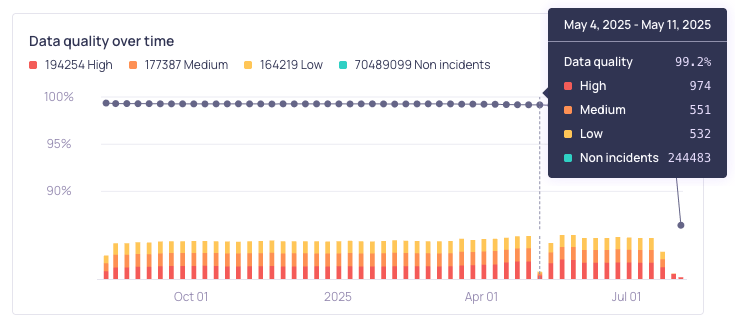
The Data quality over time graph on the Overview page
Backfill incidentsWhen validators are reset, rerun, or initially started with backfill, Validio processes historical data in a backfill. Administrators can enable the Auto-resolve backfilled incidents setting under Workspace > Settings to automatically resolve incidents generated during backfills. Since resolved incidents are excluded from the data quality score, this prevents historical reprocessing from negatively impacting your score. See Managing Workspace Settings.
Time to resolution metrics
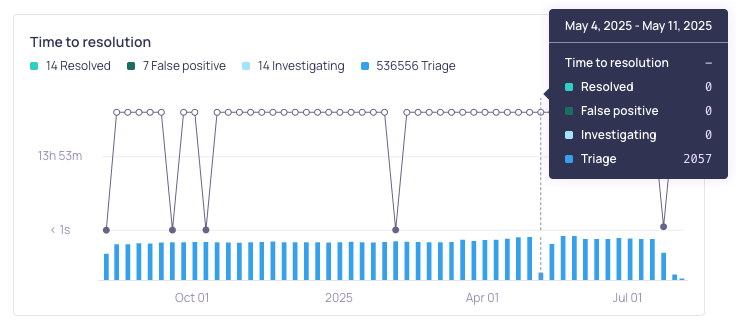
The Time to resolution graph on the Overview page