

Changelog 9.0
Validio 9.0 introduces domain lineage, glossary term classifications, data quality dimensions, redesigned notifications, and more.
Domain Lineage: A Business-level View for Lineage Graph
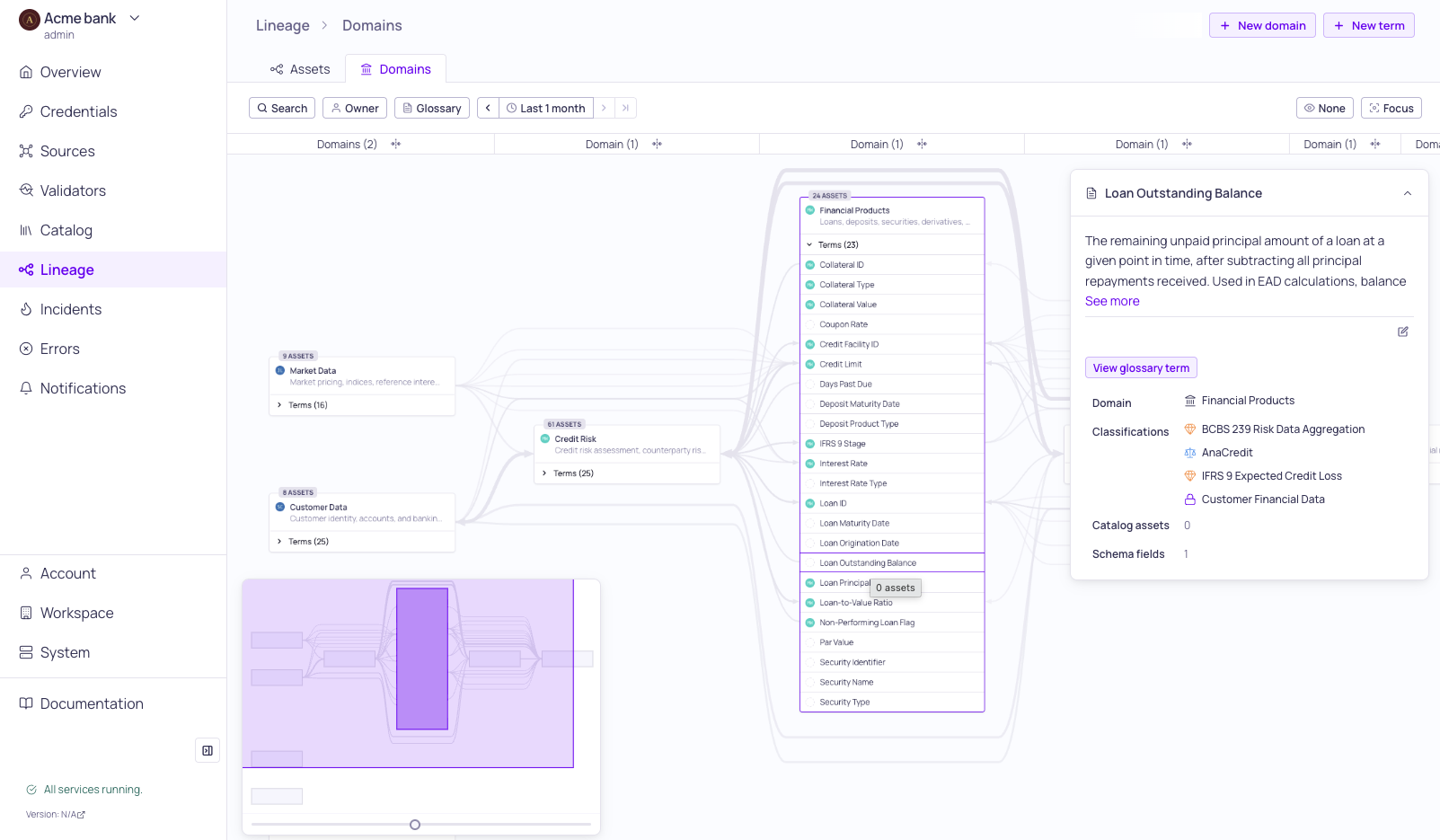
Domain lineage with glossary term sidebar
Domain Lineage is now available as a second tab on the Lineage page, giving data stewards, CDOs, and business stakeholders a business-level view of how data flows across your organization — no technical asset navigation required.
- A domain-centric perspective on lineage — Where the existing Asset Lineage tab shows tables, views, and fields, Domain Lineage shows domains as nodes with their assigned glossary terms as child items, and term-to-term relationships as the edges between them.
- No anchor required — Unlike Asset Lineage, the full domain graph loads immediately when you open the tab.
- Auto-derived from metadata you already maintain — If you've assigned glossary terms with domains to your catalog assets or schema fields, your domain graph is already available. Coverage grows as you expand glossary term assignments.
For details, see About Domain Lineage and Using Domain Lineage.
Classifications
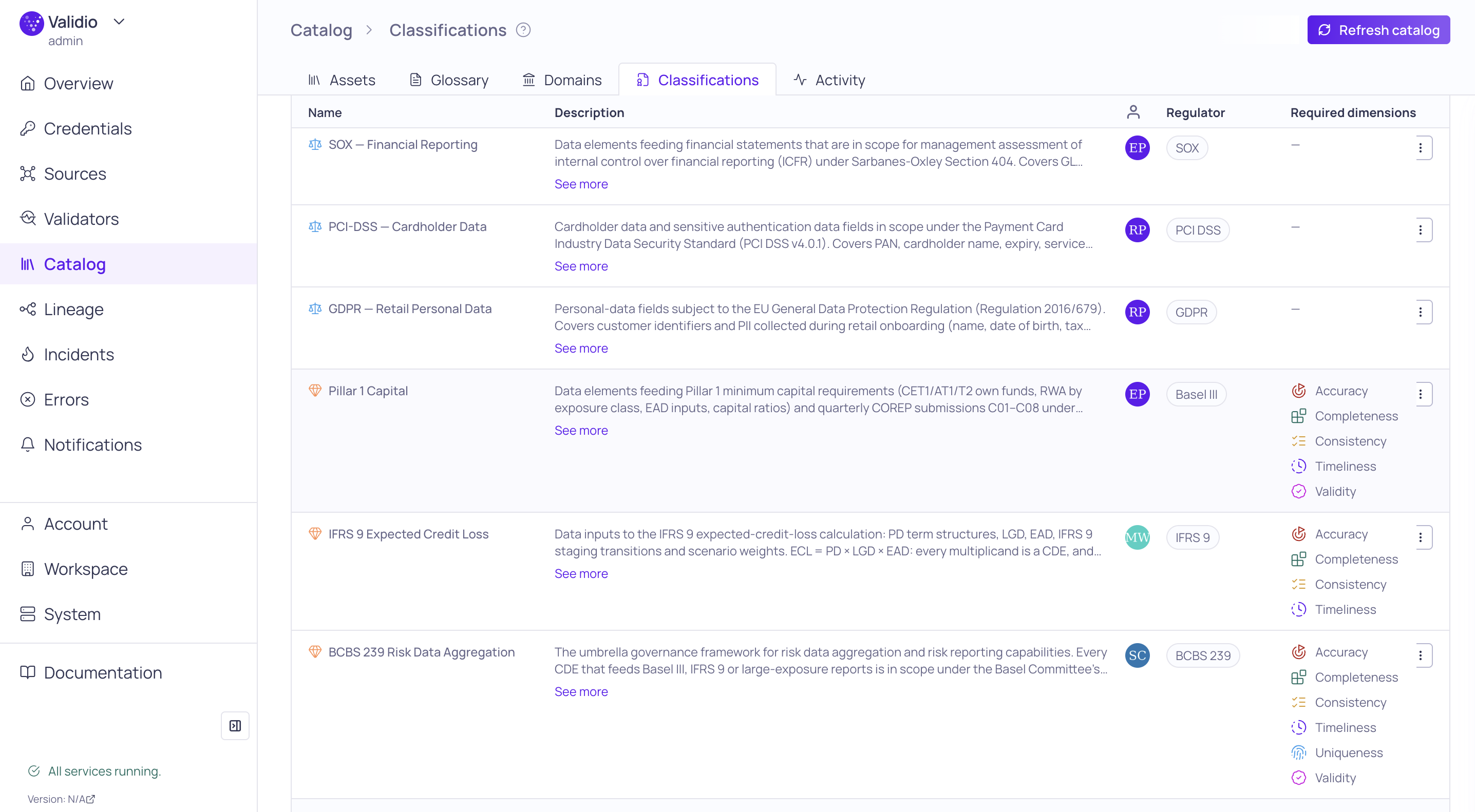
Classifications tab
Classify glossary terms with Critical Data Elements, Regulatory Scope, and Data Sensitivity. A new Catalog > Classifications tab lets you tag glossary terms with governance metadata that propagates to every schema field assigned to the term. Validio supports three classification types:
- Critical Data Element (CDE) — marks a field as critical to a business or regulatory outcome. Carries an owner, a regulator, and a set of required data quality dimensions that drive coverage rollups.
- Regulatory Scope — marks a field as in scope for a regulation (e.g., GDPR, BCBS 239, SOX) without making the stronger CDE statement of operational criticality.
- Data Sensitivity — marks a field with a sensitivity level (Public, Internal, Confidential, Restricted) to support handling and access decisions.
Classifications surface in the schema field sidebar, on the glossary term data quality tab as "Required by" links, and as a filter facet on the Schema Fields list. Permissions are governed by new classifications:READ / classifications:WRITE capabilities (Viewer and Editor/Admin by default). See Classifications.
Data Quality Dimensions
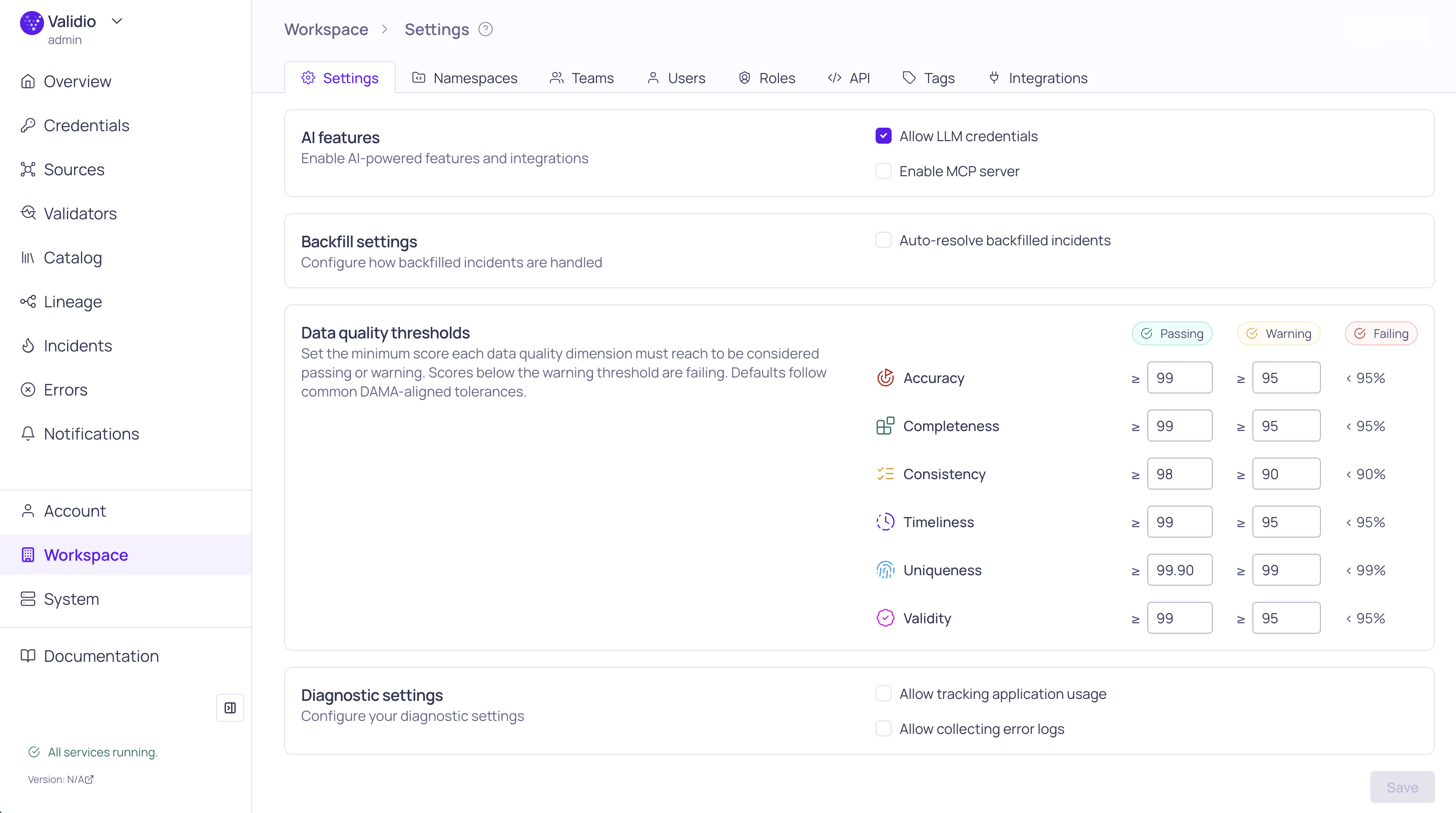
Data Quality threshold settings
Tag every validator with a DAMA-aligned data quality dimension and the schema fields it governs. Each validator can now declare a single dimension — Completeness, Validity, Timeliness, Accuracy, Consistency, or Uniqueness — and an explicit list of Critical fields (the data quality fields the validator is intended to govern, distinct from the technical fields it computes on).
- The validator configuration wizard pre-fills the dimension based on validator type and the data quality fields based on the metric configuration; both can be edited at any time.
- The validators list shows a colored dimension chip per row and adds Dimension and Critical fields filter facets.
- Dimension tagging drives coverage rollups across the catalog: CDE required-dimension coverage on classifications, per-dimension health on glossary term details, and gap-aware suggestions from the validator recommendation agent.
- Workspace-level Passing / Warning / Failing thresholds for the per-dimension health bands are configured on Workspace > Settings.
Notification Channels and New Integration Settings
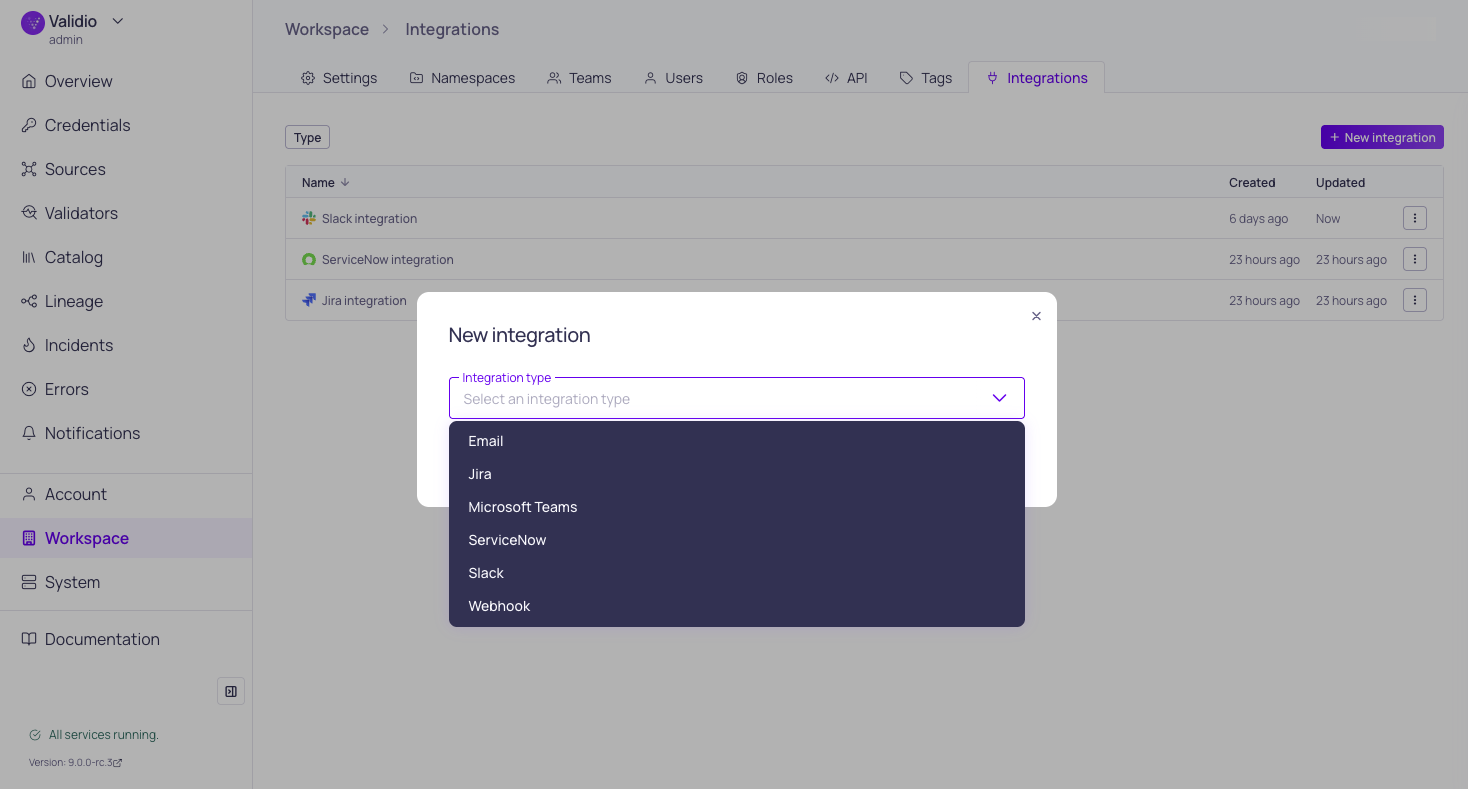
Integration page with type selection window
We've reorganized how you configure alerting in Validio into a three-part model: integrations, channels, and rules.
- Integrations are now a first-class, workspace-wide resource managed at Workspace > Integrations. An integration stores the connection and credentials for an external service (Slack workspace, Jira instance, SMTP server, ServiceNow tenant, etc.) once — you no longer re-enter them per channel.
- Notification channels reference an integration and add the destination details for a specific alert flow, such as a Slack channel ID, a Jira project key, or recipient email addresses. One integration can back any number of channels, so you can route to multiple Slack channels or Jira projects without re-authenticating.
- Notification rules now live inside a channel and are managed from the channel details page. Each rule defines the conditions that trigger alerts on its channel (by source, severity, tag, owner, segment, or type), and the channel details page also shows a delivery feed so you can verify that alerts are reaching the intended destination.
Migration of Channels to Integrations: When you update to Validio 9.0, existing channel credentials will be automatically migrated to integrations.
For more details, see About Notifications, Notification Channels, and Adding Notification Rules.
Jira Integration
You can now create Jira issues from Validio incidents, source errors, schema changes, and segment-limit events, so your team can triage data problems in the same tracker you already use.
Create the Jira integration once at Workspace > Integrations, then create one or more channels that route notifications to specific Jira projects and issue types. Add notification rules on each channel to control which incidents become Jira issues. Webhook-based sync pushes Jira status updates back into Validio. Supports both Jira Cloud and Jira Data Center.
For prerequisites, authentication setup, and channel configuration, see Jira
Gemini Enterprise LLM Credential
You can now connect Validio to Google's Gemini models on Gemini Enterprise Agent Platform (Vertex AI) by adding a Gemini Enterprise LLM credential. Use the credential to generate SQL for custom validators and filters, generate descriptions, and to power validator recommendations. See Gemini Enterprise to get started.
Freshness Dynamic Thresholds Improvements
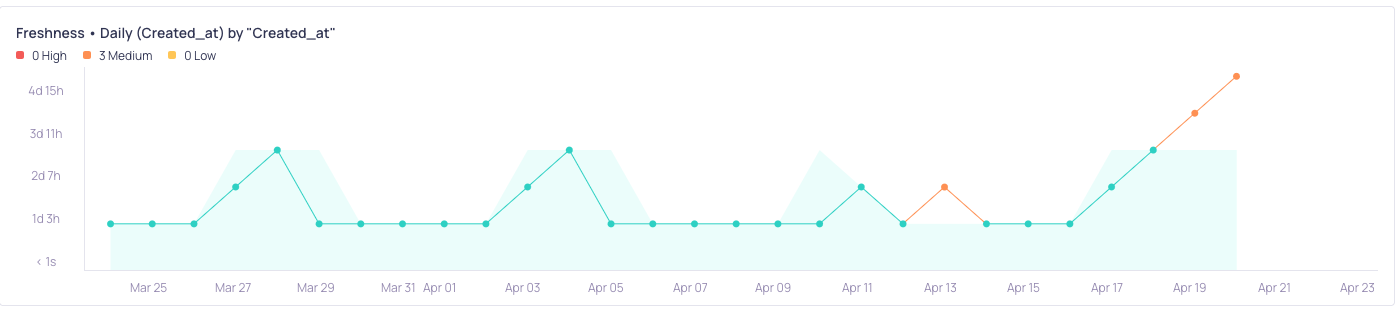
Day-of-week seasonality with an additional fresh datapoint on a Saturday
We've updated how dynamic thresholds work for Freshness validators to give you more predictable, time-aware alerting.
Sensitivity preset behavior has changed:
| Preset | Previous behavior | New behavior |
|---|---|---|
| Narrow | Alerts as soon as data is late | Alerts as soon as data is late (unchanged) |
| Default | Allowed 1 extra window late | Alerts as soon as data is late |
| Wide | Allowed 2 extra windows late | Allows 1 extra window late |
If you previously relied on Default for a one-window grace period, switch to Wide to preserve that behavior.
Other improvements:
- Smarter seasonality detection — The model automatically detects Hour of day, Day of week, Week of month, and Month of year patterns in data arrival times.
- Early arrival adaptation — When a seasonality pattern is detected (e.g., data regularly going stale on weekends), a single fresh data point arriving mid-pattern no longer interrupts the expected stale period or triggers an incident.
- Upper decision bounds by default — Freshness validators now default to Upper bounds, alerting only when data is later than expected.
- Time-aware model feedback — False positive and false negative feedback only affects the part of the schedule it applies to. Marking a Saturday delay as a false positive won't loosen expectations on Tuesdays.
For more details, see Dynamic Thresholds for Freshness.
9.0.6
Fixed Issues
- Reduced IBM Db2 profiling batch size to avoid query failure (VR-5585)
- Filter deleted validators from DQ severity counts (UI-6505)
- Scoped notification rule Source and Owner options to channel namespace (UI-6517)
9.0.5
Validio 9.0.5 was released on 27 May 2026.
Fixed Issues
- Fixed collision issues with Teradata hash function (UI-VR-5571)
- Display schema field errors and sort by rang in lineage anchor dialog (UI-6374)
- Order exact name matches before prefix matches in catalog asset search results (UI-6464)
Features & Updates
- Added dynamic buffer size dynamic thresholds (AL-698)
- Added integration activity to the Activity log (UI-6360)
- Added Workspace setting for default DQ threshold (UI-6484)
9.0.4
Validio 9.0.4 was released on 27 May 2026.
Fixed Issues
- Fixed issues with Oracle inference query window grouping (VR-5562)
- Teradata: Cast the lookback timestamp during profiling to resolve database compatibility issues (VR-5567)
- Mapped Teradata credential to Teradata SQL catalog asset (UI-6463)
- Added support for
IS NOT ANY OFoperator on past incident groups filter (UI-6455) - Dispatch change event when reselecting cleared combobox value via typing (UI-6465)
- Guard empty namespaces in
getSourceCount(UI-6456) - Stop
updateQueryfrom wiping history mid-navigation (UI-6258)
Features & Updates
- Added notification rule condition for incident group priority (VR-5539, UI-6457)
- Added notification rule condition for segmentation (UI-6379)
- Teradata: Manually infer view types if qvci is disabled (VR-5563)
- Refactored sample data analysis (AL-708)
- Removed high default case (AL-705)
9.0.3
Validio 9.0.3 was released on 26 May 2026.
Fixed Issues
- Fixed a state issue in metadata row count validators (VR-5553)
- Repaint DQ dots color once thresholds load (UI-6431)
- Show working pagination on channels list (UI-6448)
- Display selected items and prevent crash on large Enum Filter lists (UI-6415)
- Hide the sampling slider when an asset is in an unresolved state (UI-6439)
- Hide parallel ancestor to descendant edges in asset Focus (UI-6450)
- Make it possible to trigger the logout menu from the whole sidebar header (UI-6438)
- Expose
GenericCatalogAsseton the public schema (UI-6447) - Show daily window incident timestamps in UTC (UI-6442)
- Preserve wizard form data when you navigate "back" (UI-6395)
- Apply pending markdown in catalog asset descriptions after async editor creation (UI-6454)
Features & Updates
- Added a notification rule condition for incident group priority (VR-5537)
- Ensure that invalid validator segments delete on reset (VR-5547)
- Limit seasonality-related overshoot issues (AL-576)
- Add support for updating Classifications (UI-6432)
- Add separate
/healthz/liveand/healthz/readyprobe endpoints (UI-6419, VR-5542)
9.0.2
Validio 9.0.2 was released on 22 May 2026.
Fixed Issues
- Populate Db2 database in source wizard from the credential (UI-6410)
- Moved critical fields popover out of the sidebar key-value column (UI-6425)
- Stopped counting default time range as an active filter (UI-6426)
- Show integration on channel list, sidebar, and details (UI-6422)
- Removed sampling from Db2 z/OS since it's not supported (UI-6414, VR-5373)
- Display time details regardless of window on metric graph tooltip (UI-6214)
- Fixed handling of notification rules with deleted entity references (UI-5616)
- Fixed issues with Lineage focus mode (UI-6378)
- Fixed navigation issues for Classifications (UI-6399)
- Fixed tag editor permissions during source and validator creation (UI-6396)
- Populate Regulator and Owner drop down in Classifications tab (UI-6398)
- Fixed stale counts for credentials and catalog assets on their respective pages (UI-6384)
- Added throttling to ingress polling to manage data load and improve system reliability (VR-5373)
- Fixed issues in dynamic thresholds on freshness validators related to the burn-in period (AL-711)
- Fixed issues with duplicate global window row count metrics (VR-5540)
- Detect field lineage if qualified table mismatch (VR-5543)
Features & Updates
- Added classifications to glossary term overview pages (UI-6423)
- Renamed "Add" to "Edit" on glossary term and tag selectors (UI-6417)
- Added namespace filtering to notifications (UI-6326)
- Added lineage support for arbitrary intermediate tables (VR-5475)
- Added Teradata LOCK clause (VR-5517)
- Added incident owner to notification messages (Slack and Microsoft Teams) and webhook payloads (VR-5523, VR-5525, VR-5526)
9.0.1
Validio 9.0.1 was released on 20 May 2026.
This release included version updates to services.
9.0.0
Validio 9.0.0 was released on 19 May 2026.
Fixed Issues
- Fixed issues with rerun for stateful validators (VR-5485)
- Ensure default database is set when computing lineage for SQL sources and validators (VR-5483)
- Refined the logic for retrieving the current Pluggable Database (PDB) (VR-5502)
- Standardized the DB2 probe query to a portable format supported across all versions (VR-5493)
- Ensure that Oracle, Microsoft SQL Server, and Azure Synapse sources use the correct catalog asset types (UI-6330)
- Ensure incident debug samples display real query errors (UI-6240)
- Ensure validator descriptions entered from the creation wizard are persisted (UI-6213)
- Fixed UI behavior issues with tag and time range popovers (UI-6168, UI-6257)
- Fixed sidebar issues with url-driven row clicks, alignment, and styling (UI-6348, UI-6354)
- Use 24 hour time format consistently in graph axis (UI-6215)
- Include HTTP status codes in network error messages (UI-6339)
- Fixed issues with segmentation preview scroll, row reconciliation, and resize (UI-6359)
- Restore the original SQL query when you reject a Fix suggestion (UI-6369)
- Improved load speed of the source tables list in the Source wizard (UI-6352)
Features & Updates
- Added support for domain-level lineage (UI-6063)
- Added new UI and routing for channel notification rules (UI-5954)
- Added more filter options to incidents filtering (UI-5462)
- Added Google Gemini Enterprise as an LLM credential (UI-6161)
- Added support for data quality dimensions and CDEs (UI-6207)
- Added catalog asset activity log support (UI-6312)
- Added test button to channel dialogs (VR-5489, UI-6324)
- Added rerun validator action to Incidents page (UI-6323)
- Reduced spurious seasonal-pattern detections when incidents change direction (AL-703)
- Refactored the freshness model to be time-relative, improving detection accuracy for irregular data streams (AL-647)
- Improved rendering of lists and columns reusing DOM elements (UI-6104)
- Improved notifications setup, and support multi-tag conditions (UI-6314)