

Changelog 8.1
Validio 8.1 introduces a redesigned data Lineage, Business Glossary and Domains, OpenAI LLM credential, and IBM Db2 integration support.
Data Lineage Redesign
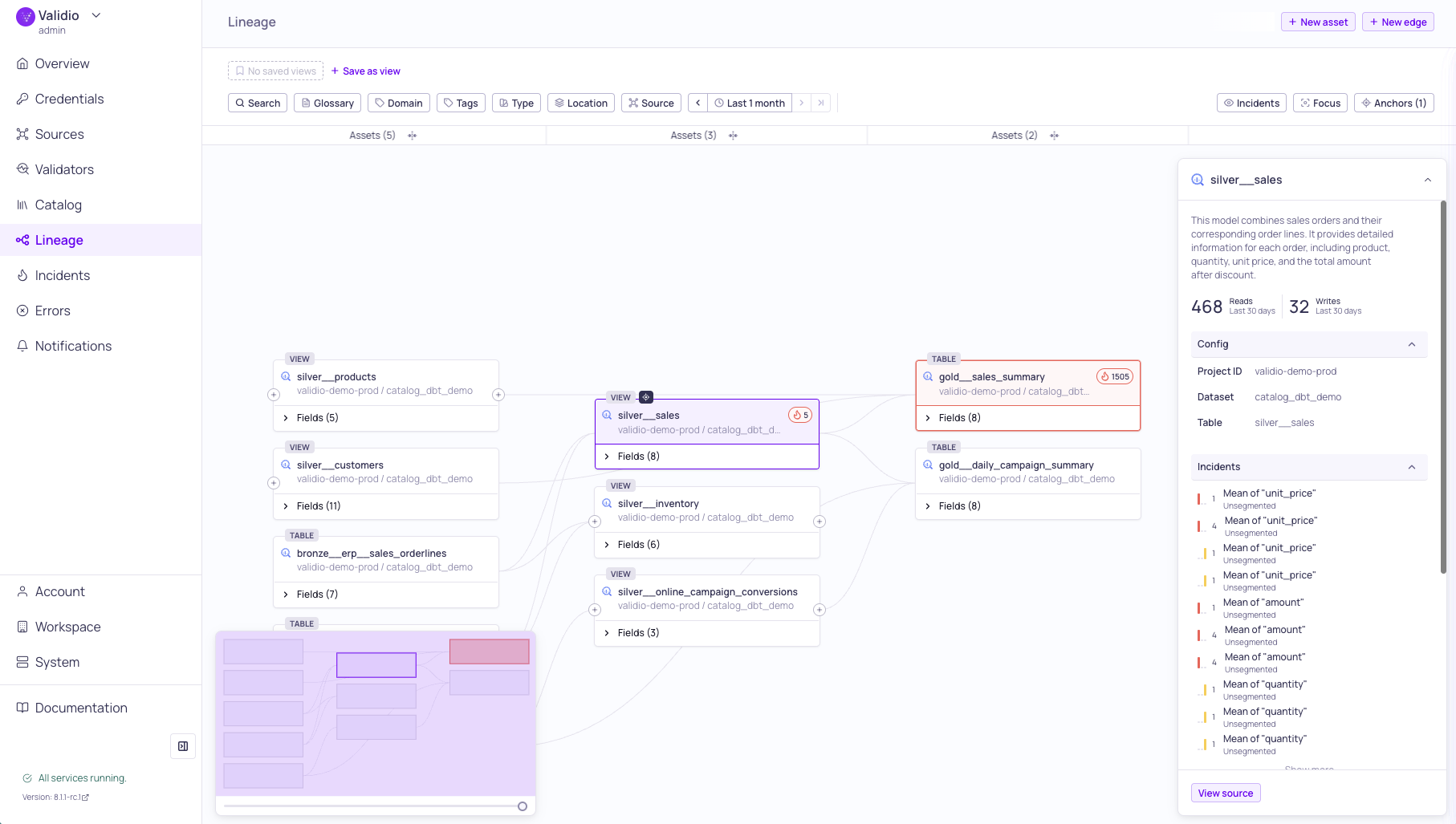
Lineage graph with Incidents overlay and details sidebar
The Lineage page has been rebuilt with a new interactive graph for exploring how data flows through your pipelines. You can now set multiple anchor points — assets or fields — as entry points to explore lineage from different perspectives. The graph uses progressive loading, rendering only nearby nodes initially and fetching additional connections as you expand outward, so large lineages remain navigable. Data quality scores and incident indicators can be overlaid directly on nodes for impact analysis, with a time range control to narrow the view to a specific period.
Key capabilities include:
- Focus mode — Isolate the full chain of transitive dependencies for a selected node or field, hiding unrelated paths to reduce clutter from parallel processes.
- Collapsible layers — Collapse intermediate pipeline layers to see direct upstream-to-downstream relationships without the complexity of middle transformation steps.
- Manual assets and connections — Add assets that aren't automatically discovered, such as tables from databases without a native integration, and create custom lineage connections between any assets.
- Saved views — Save anchor and filter combinations as named views to revisit specific lineage perspectives across your workspace.
For more information, see About Data Lineage and Using Lineage.
Business Glossary and Domains
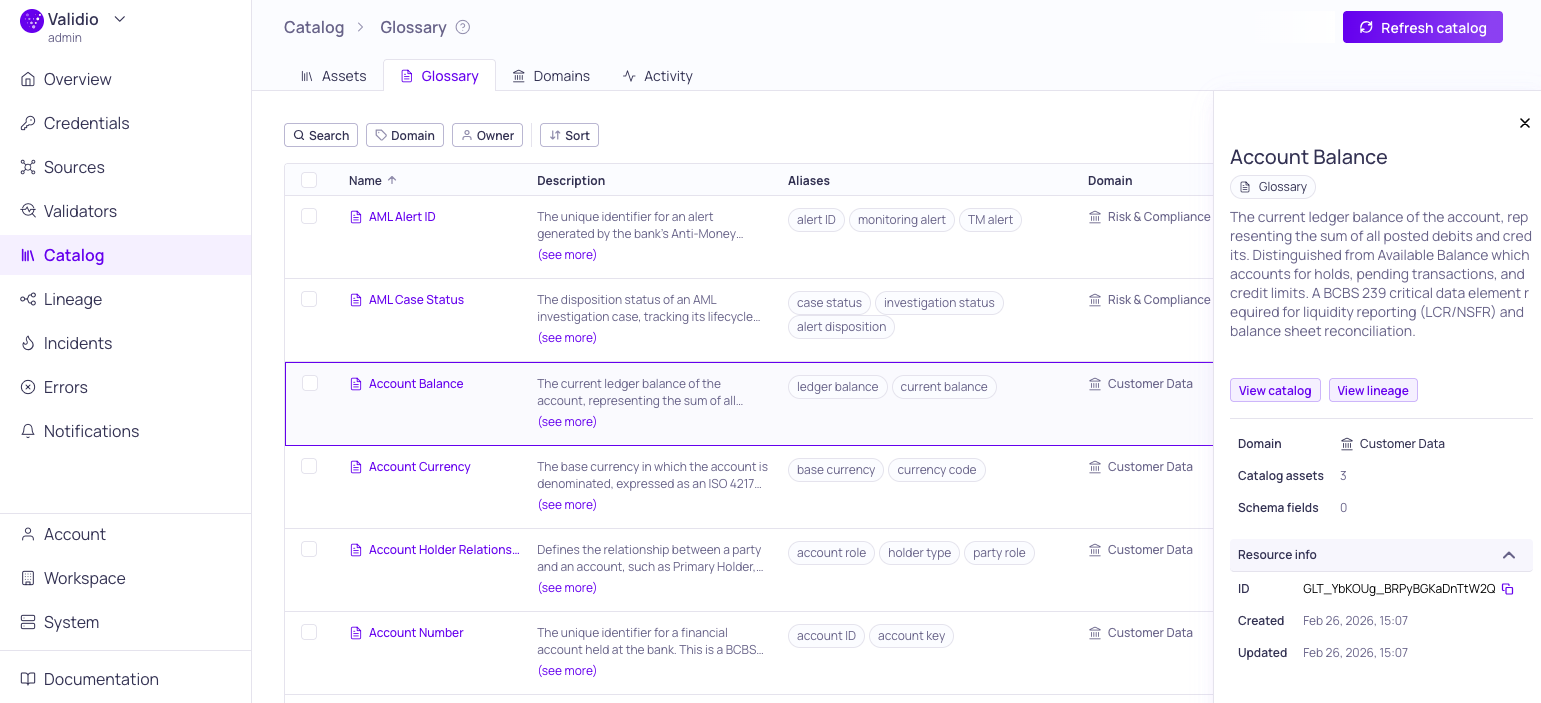
Business Glossary tab with details sidepanel
Catalog now includes a Business Glossary for defining and managing business terms, and Domains for organizing terms and assets by business area. You can create glossary terms with descriptions, aliases, domains, and owners, and search matches against all three fields — for example, searching "ECL" finds the term "Expected Credit Loss".
Key capabilities include:
- Domains — Group glossary terms and catalog assets by business area such as Finance, Marketing, or Engineering, with dedicated owners and descriptions. See Domains .
- Term assignments — Terms can be assigned to catalog assets and schema fields from the catalog, asset details, or directly from the lineage sidebar. See Glossary Term Assignments .
- Term propagation — Propagate terms upstream or downstream through lineage edges. Removing a manual assignment automatically cleans up its propagated copies. See Glossary Term Propagation .
- AI-powered suggestions — A glossary term matcher agent suggests which untagged assets should be associated with a term, with confidence levels for user review and approval. See Glossary Term Suggestions .
- CSV import/export — Bulk-create or update terms via CSV. Imported terms still need to be assigned to assets separately. See Managing Glossary Terms .
- Activity log — Track all changes to glossary terms, including creation, updates, assignments, and removals, for audit and compliance purposes. See Glossary Term Details .
For more information, see About Data Catalog and Business Glossary .
OpenAI LLM Credential
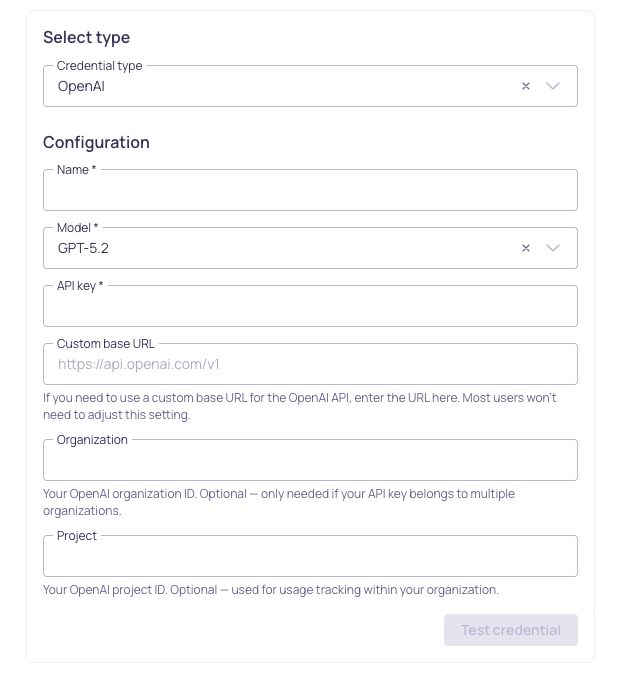
OpenAI credential configuration
You can now configure OpenAI as an LLM credential in Validio to leverage GPT models for AI-assisted SQL generation and validator recommendations. Each credential is tied to a specific model, so you can add multiple credentials to use different GPT models across your workspace. OpenAI credentials support custom base URLs for proxy or custom endpoint configurations, as well as organization and project IDs for usage tracking.
For setup instructions, see OpenAI. For an overview of all supported LLM providers, see LLM Credentials.
IBM Db2 Integration
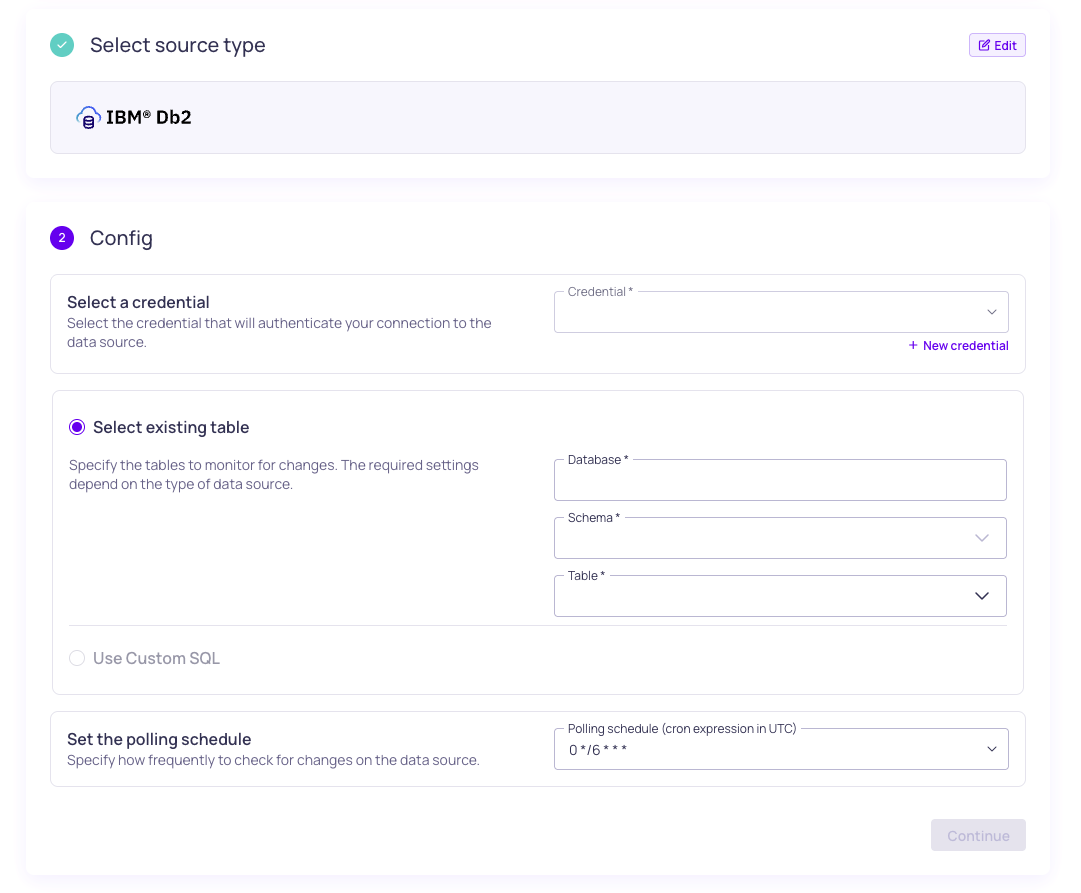
IMB Db2 source configuration
Validio now supports IBM Db2 as a transactional database source. Connect to Db2 databases running on LUW (Linux, UNIX, Windows) or z/OS (IBM Z mainframes) to monitor and validate your operational data. Db2 sources support table selection, custom SQL queries, and optional TLS encryption for secure connections.
For setup instructions, see IBM Db2.
8.1.3
Validio 8.1.3 was released on 9 April 2026.
Fixed Issues
- Improved detection and handling of periodic seasonality for sparse time series (AL-670)
- Fixed window truncation mismatch (VR-5349)
- Fixed handling of nullable time column for Databricks foreign catalogs (VR-5355)
- Skip unavailable Oracle services in catalog (VR-5350)
8.1.2
Validio 8.1.2 was released on 25 March 2026.
Fixed Issues
- Fixed issues with the performance of lineage queries (UI-6024)
- Fixed issues with Overview page query performance (UI-6039)
- Fixed a service error in finding matches and improved performance (UI-6026)
- Fixed an issue where activity for glossary terms did not show for collapsed history (UI-6031)
- Fixed an issue with updating Snowflake source config fields (UI-6038)
- Fixed an issue with page load for catalog assets tab (VR-5321)
- Truncated field names in lineage to ensure badges are visible (UI-6021)
Features & Updates
- Improved the test functionality for Slack notification channels (UI-6015)
- Changed segment usage options to sort by size (UI-6018)
8.1.1
Validio 8.1.1 was released on 23 March 2026.
Fixed Issues
- Fixed an issue to ensure reconciliation validator metrics are ordered (VR-5298)
- Fixed an issue where updating sources failed when config fields remain unchanged (VR-5285)
- Fixed an issue to ensure the correct asset schema is used for sampling and profiling (VR-5292)
- Fixed inconsistent results for "Select all" on active source filters in validators (UI-5980)
- Fixed "Transition was skipped" error when navigating lineage graphs (UI-6005)
- Fixed a global window issue where the first data point was not visible after backfill (UI-5968)
Features & Updates
- Added business glossary and updated lineage (UI-5803)
- Added descriptions from generated recommendations to validator descriptions (UI-6000)
- Added support for IBM Db2 credential, source, and asset configuration (UI-5723)
- Added support for Snowflake authentication using PAT (programmatic access token) (VR-5296, UI-6003)
- Added support for both base64 encoded and plaintext GCP credentials (VR-5265)
- Added SQL Execution as a namespace-level permission for SQL-related features including incident debugging and SQL sources, filters, and validators. By default, any existing custom roles will be assigned
sqlExecution:WRITEpermissions. - Extended profiling and recommendations to include boolean fields (VR-5291, UI-5997, UI-6010)
- Converted incident listing (global and source) pages to new format, with performance improvements (UI-5827, UI-5765)
- Improved handling and detection of sparse time series data (AL-636)
- Changed user analytics default to opt-in for fresh installs (UI-5988)
- Improved Slack channel test functionality (VR-5304)