

LLM Credentials
Configure LLM credentials in Validio to leverage AI capabilities
LLM Credentials allow you to connect Validio with external Large Language Model (LLM) providers like Anthropic's Claude to leverage AI capabilities that can automatically generate SQL queries for your custom data validation rules and filters. See how LLM credentials are used for Generating SQL in Validators and Filters.
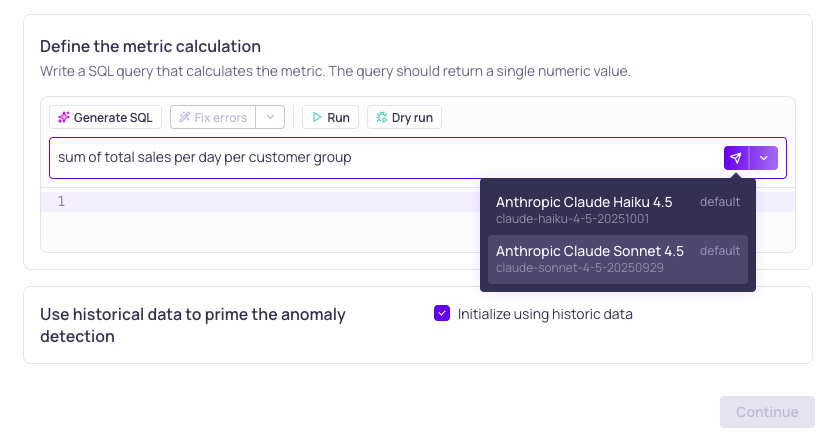
Selecting an LLM credential and model to generate a SQL query
Enabling LLM Credentials
Before configuring credentials for external LLM providers, ensure you have enabled the AI feature > Allow LLM credentials in your Validio Workspace. You need WRITE permissions for Global Settings to manage this setting. See Configuring Global Settings.
To understand what data Validio sends to LLMs when AI features run, see AI Data Transparency.
Configuring LLM Credentials
Each LLM credential is configured for one LLM provider and model. If you want to use different models, you need to create a credential for each model. For example, create separate Anthropic credentials for Claude Sonnet 4.5 and Claude Haiku 4.5.
We recommend models released within the past year, as newer models tend to produce better results. When you select a model, some providers resolve the name to the latest available version via an alias (for example,
claude-sonnet-4-5may point to different releases over time). This means behavior can change without any update on the Validio side. To avoid unexpected differences, you can specify an exact model version (for example,claude-haiku-4-5-20251001) in the credential configuration.
See configuration instructions for each supported LLM credential.
Supported LLM Credentials
- Amazon Bedrock: Leverage Amazon Bedrock foundation models to generate SQL queries in custom validators and filters.
- Anthropic: Leverage Claude AI models to generate SQL queries in custom validators and filters.
- OpenAI: Leverage OpenAI GPT models to generate SQL queries in custom validators and filters.
Updated 6 months ago