

Changelog 11.1
Validio 11.1 introduces resource preview cards, updating threshold types on existing validators, and more.
Resources: Preview on Hover
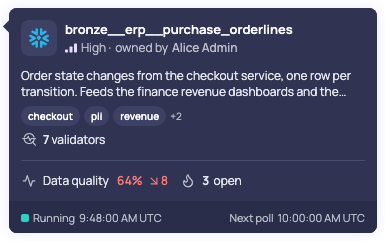
Example of a source preview card
Hover over a resource link anywhere in Validio, in lists, sidebars, the Lineage graph, or the activity log, to see a compact card that summarizes the resource without leaving the page. A card shows what the resource is, key details such as its owner, tags, and related resources, and whether it needs attention, including its data quality, open incidents, and problems such as a failed poll.
Cards open when you hover over or focus a link, and you can pin a card to follow the links inside it. Hover cards are available for most resources, including sources, validators, incident groups, catalog assets, glossary terms, and teams. A few link types, such as tags, show only the name.
See Navigating with Resource Links.
Thresholds: Change the Threshold Type of an Existing Validator
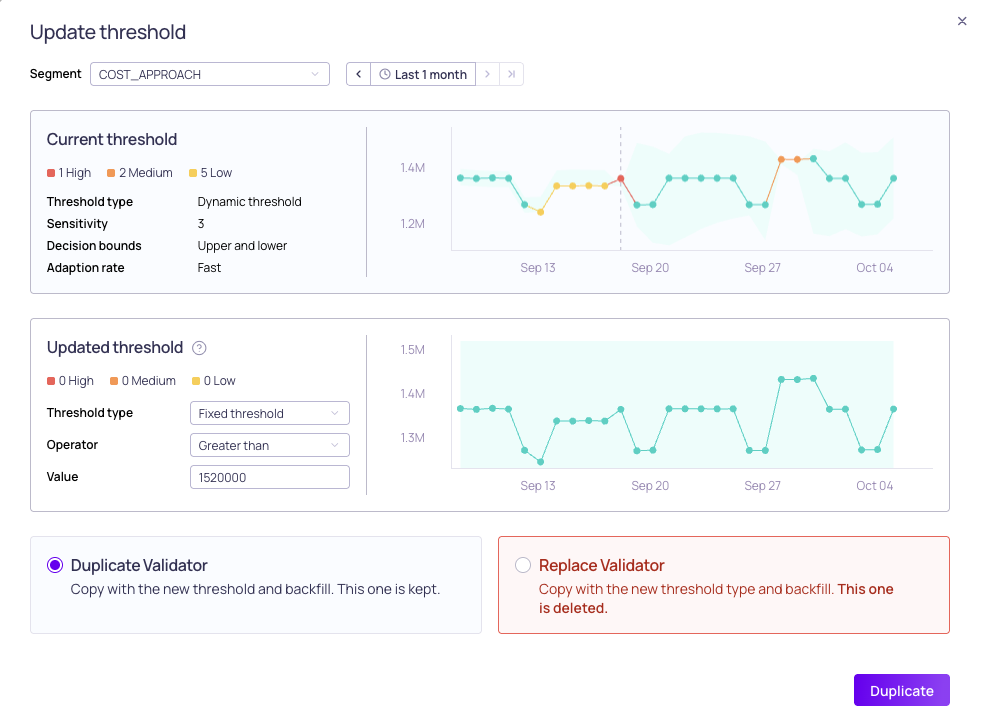
Changing the threshold type
You can now switch an existing validator to a different threshold type, for example from a dynamic threshold to a fixed threshold, as you learn more about how a metric behaves. Previously, a validator’s threshold type couldn’t be changed after it was created.
In the Update threshold dialog, choose the new threshold type and preview how often it would have alerted. Then choose Duplicate Validator to keep the original validator, or Replace Validator to replace it. Replace Validator deletes the original validator, including its ID and activity history, so use Duplicate Validator to keep them. Replace Validator isn’t offered in namespaces with approval workflows enabled, or when a reconciliation validator references the validator.
See Updating Thresholds.
11.1.1
Validio 11.1.1 was released on 7 October 2026.
Fixed issues
- The validator status card on a validator’s metric page now shows the correct state. This includes sources that are stopping or not started, who stopped a source, and error details (UI-8429)
- A validator’s metric page no longer stalls while the validator is receiving frequent updates (UI-8428)
- Values very close to zero in the incident group summary now display as 0 instead of with many trailing decimal places (UI-8449)
11.1.0
Validio 11.1.0 was released on 6 October 2026.
New features
- SQL validator queries are now test-run before you continue or save, and you're warned if the test run fails (UI-8378)
- Filter validators by errors, such as a failed poll or a field error, and sort by latest poll to see failed polls first (UI-7898)
- A source's location now shows wherever sources are listed or selected (UI-8376)
- A validator's metric page now shows its status, such as Running or Source stopped, and lets you start a stopped source from there (UI-7293)
- The activity log now shows changes to filter conditions and filter values (UI-6914, VR-5977)
- Every API response and GraphQL error now includes a request ID you can give to support (UI-8371)
Fixed issues
- Lineage is now built for Snowflake multi-table inserts (
INSERT ALLandINSERT FIRST), which previously produced no lineage (VR-5947) - Starting or stopping a source, or renaming a notification rule, now shows an error when the action is refused (UI-7304)
- Deleting a resource that another resource still uses now returns a clear
RESOURCE_IN_USEerror instead of a raw database error (UI-8418) - Filtering the catalog by domain now includes assets whose glossary terms are on their fields (UI-8370)
- The Accept selected count in Suggested edge matches no longer includes suggestions from earlier runs (UI-8388)
- Catalog assets are linked again for BI credentials that connect to the same system (VR-5974)
- Debug sample values are now shown exactly as returned, so text values keep their leading zeros and large IDs are no longer rounded (UI-8366)
- Data previews now show the query's values in a column named
idinstead of the row number (UI-8385) - Validator archive and unarchive events now appear in the activity log (UI-7293)
- The error icon on a source's tabs, such as Validators, now explains what's wrong and where to look (UI-8396)
- Required fields in the validator wizard are now marked and explained (UI-8384)
- A validator's name is kept when you create a filter from its dialog (UI-8410)
- Guidance notes are hidden when statistical ML is selected for validator recommendations (UI-8374)
- Display names can no longer be left blank (UI-8277)
- Keyboard focus in the saved-view toolbar now follows the order you see on screen (UI-8044)
Deprecations
- The
Segment.dataQualityfield on the public API is deprecated (UI-8375)