

Changelog 10.2
Validio 10.2 includes updates to notifications, business glossary, and more.
Notifications: Tag owners in Slack and Teams messages
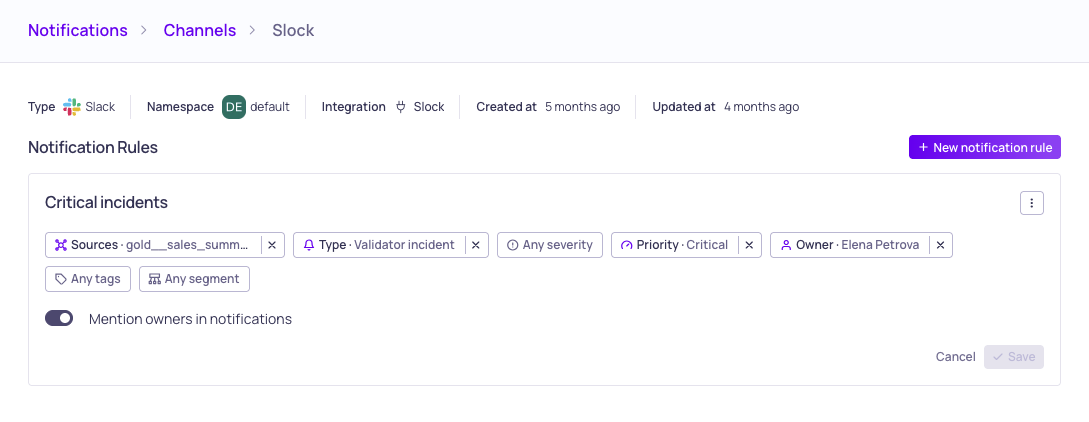
Notification rule configuration with owner tagging option
A notification rule can now tag the relevant owner directly in the Slack or Microsoft Teams messages it sends, so the person responsible for a source or validator is pulled into the thread instead of having to spot a channel post.
Tagging is opt-in per rule, so existing rules keep their current behaviour until you turn it on. Open the Slack or Microsoft Teams notification channel's details page, edit the rule, and enable owner tagging ("Mention owners in notifications").
For more information, see Adding Notification Rules.
Business Glossary: Promote propagated terms in bulk
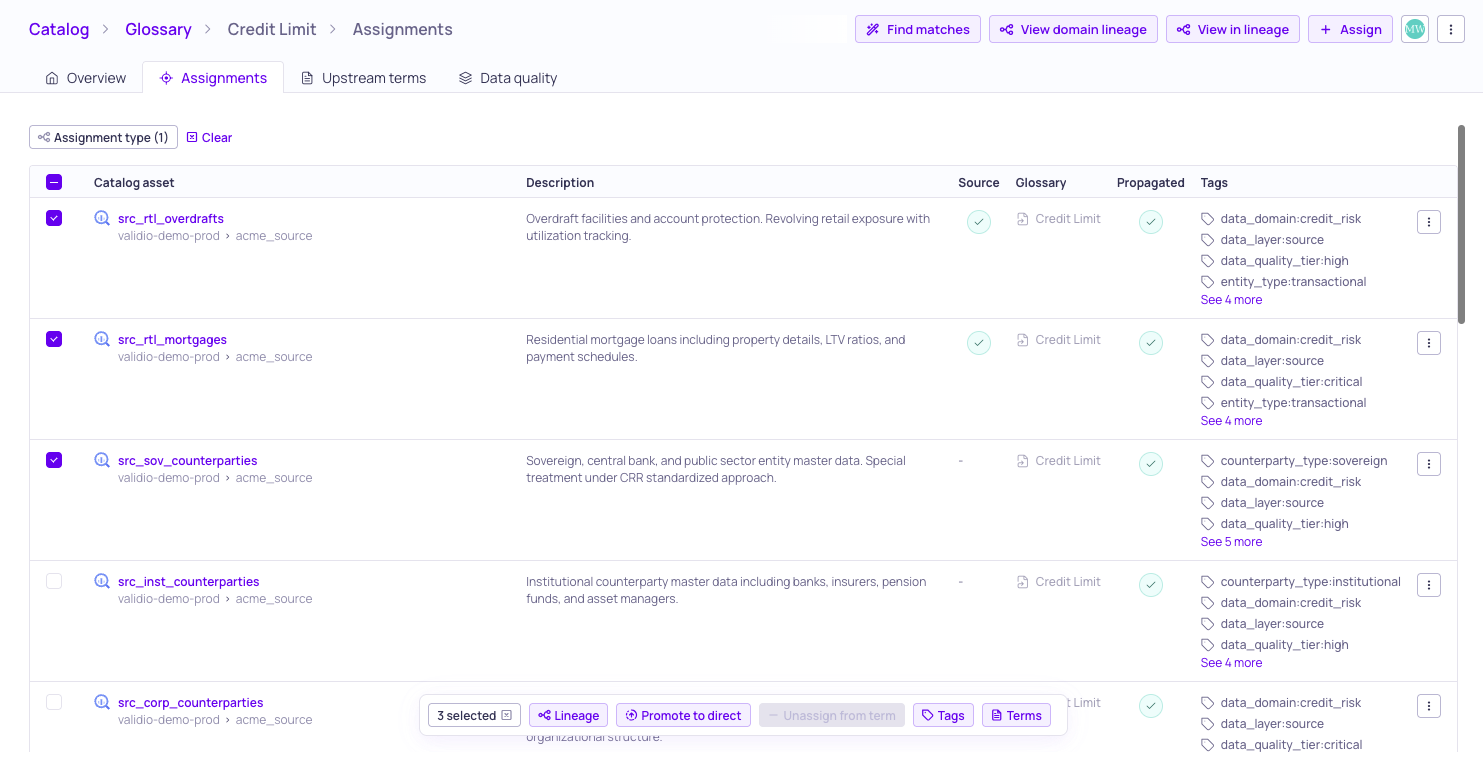
Bulk action to promote propagated assignments
Glossary terms that reach an asset through propagation can now be promoted in bulk. Previously each propagated assignment had to be confirmed one at a time, which made accepting the results of a propagation run across a wide table slow going.
Select the propagated assignments you want to keep and promote them together, turning them into direct assignments in a single action.
For more information, see Glossary Term Propagation.
10.2.1
Validio 10.2.1 was released on 2 September 2026.
Fixed issues
- Activity entries for a deleted user now name that user instead of showing N/A (UI-7314)
- A custom name typed into the save dialog for a debug query is now kept, so the query can be saved (UI-7349)
- The New version available prompt no longer appears repeatedly (UI-7313)
10.2.0
Validio 10.2.0 was released on 27 August 2026.
Improvements
- Lineage is now built through SAP IQ stored procedures, so the tables a procedure reads and writes appear in Catalog and Lineage (VR-5868, VR-5861, VR-5864, VR-5801)
- Lineage node fields are now paginated, with fields referenced by an edge pinned into view (UI-6308)
Fixed issues
- Deleting a resource that is already gone is treated as a success again, so repeated Validio Code (IaC) applies no longer fail (UI-7282)
- Global admins who are not namespace admins can now use the row menu actions their permissions already allow (UI-7232)
- Manual source poll progress now resolves the source it was asked about instead of failing (UI-7297)
- The confirmation dialog for removing a team member now names that member, and removing several members asks for confirmation first (UI-7300)
- Glossary terms now propagate across the complete lineage closure, reaching upstream columns that were previously missed (UI-7121)
- The activity log on a source now loads its entries instead of appearing empty (UI-6922)
- Temp tables read within the same multi-statement query now produce lineage (VR-5760)
- Debug queries for the unique count metric on Teradata now return results (VR-5840)
- The Update view menu on a saved view is now reachable when the view has no unsaved changes (UI-7215)
- Owner avatars in select dropdowns are back to their normal size and no longer overflow the dialog (UI-7259)
- Source and filter previews now honour their configured timeout and stop running once abandoned (UI-7163)
- Live updates no longer stop arriving when the server receives a burst of events (UI-7180)
- Permission checks are now applied even when a resource identifier cannot be resolved (UI-7202)
- Data sensitivity values are now accepted by the GraphQL API (UI-7208)