

Changelog 9.2
Validio 9.2 introduces support for exporting Validio data as CSV and new integrations for Progress OpenEdge and SAP IQ.
Exporting Data as CSV
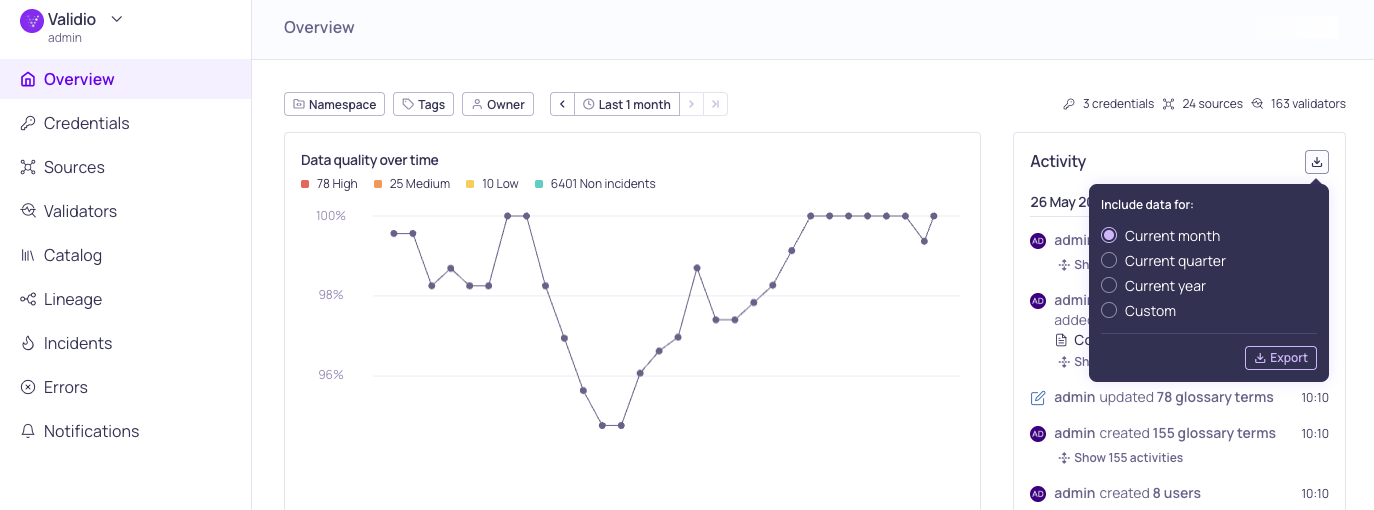
Export button on the Overview Activity log
You can now export Validio data as CSV — both from the Export buttons in the UI and via the new CSV Export API. Pull sources, validators, incident groups, activity history, sample data, and incident debug records into your reporting, archival, and BI workflows.
What you can export:
- Sources, validators, and incident groups — full metadata with filtering and sorting that mirror the UI.
- Activity log — audit history with actor, action, and entity context. Entries for deleted resources keep their
original names, so records like "user X deleted source Y" stay readable. - Sample data and incident debug records — query results exported on demand, with columns determined at runtime.
Highlights:
- Filter and sort exports using the same field as the equivalent UI controls, including time-range bounds.
- Visibility is scoped by your permissions — each resource type appears only if your role or API key can
read it. - Endpoints are stateless GET requests, so you can schedule recurring exports with cron, Airflow, or any orchestrator to retain history beyond Validio's retention window.
- Exports are capped at 100,000 rows per request; narrow the time range or split filters for larger pulls.
Learn more in the CSV Export API reference.
New Integration: Progress OpenEdge
You can now connect Validio to Progress OpenEdge to monitor, analyze, and validate data in your OpenEdge
operational database.
Set up the integration by creating a read-only service account in OpenEdge, adding a Progress OpenEdge credential in Validio, and creating a source to monitor your tables.
Known limitations — Due to constraints in the OpenEdge SQL engine, a few capabilities aren't available for OpenEdge sources. Unsupported validators, metrics, and filter operators appear disabled with an explanatory tooltip.
For setup instructions and limitations, see Progress OpenEdge.
New Integration: SAP IQ
You can now connect Validio to SAP IQ (formerly Sybase IQ) to monitor, analyze, and validate data in your SAP IQ database — a column-oriented database built for high-performance analytics and data warehousing.
Set up the integration by creating a read-only user in SAP IQ, adding a SAP IQ credential in Validio, and creating a source to monitor your tables.
For setup instructions, see SAP IQ.
9.2.1
Validio 9.2.1 was released on 15 June 2026.
Fixed Issues
- Use proxy settings for Slack web socket connections (VR-5602)
- Fixed issues with deleted classification owners (UI-6684)
- Enable change-diff on window and filter update forms (UI-6689, UI-6688)
- Ensure validator tags display on validator details Overview tab (UI-6707)
Features & Updates
- Attach SQL job facet query to OpenLineage edges (VR-5624)
- Use SQL source code job facet as query source (VR-5625)
- Set transformation description as edge description (VR-5599)
9.2.0
Validio 9.2.0 was released on 11 June 2026.
Fixed Issues
- Removed owner tagging on new incident messages for Microsoft Teams and Slack (VR-5616)
- Teradata: Ignore permission denied in
HELP COLUMN(VR-5613) - Qualified the wildcard star projection in custom SQL validator debug queries (VR-5613)
- Rewrite CTEs to subqueries in debug and sample queries (VR-5611)
- Hide the debug button for metadata validators (UI-5680)
- Ensure entity lists sort in ascending order and case-insensitive by name (UI-6570)
- Restore pre-filled context to source creation wizard (UI-6574)
- Render pagination footer on Catalog and Source activity lists (UI-6594)
- Keep source update dialog open and show errors when save fails (UI-6592)
- Restore missing role permissions rows in edit dialog (UI-6595)
- Compute catalog asset location index in a single scan (UI-6303)
- Re-subscribe live-event stream after a fatal WebSocket close (UI-6597)
- Re-sync search panel tab on reopen of lineage edge dialog (UI-6445)
- Serialize
EventStreamQueuereloads to stop overlapping refetch storms (UI-6623) - Stop
__GetMeWithPermissionsrequest storm on expired session (UI-6625) - Request
enableCatalogfor BI credentials in refresh dialog (UI-6637) - Harden credential selection for profiling and sampling (UI-6635)
- Distinguish dbt mapping without results from no relationship (UI-6621)
- Block deletion of validators that are referenced by reconciliation validators (UI-6617)
- Keep dialog open on in-dialog download navigation (UI-6649)
- Drop validator recommendations with invalid required references (UI-6653)
- Stop errors list highlight every row by default (UI-6667)
Features & Updates
- Added support for SAP IQ source (UI-6366)
- Added support for Progress OpenEdge source (UI-6367)
- Added validator and source tags to webhook incident payload (VR-5491)
- Added color to RCA lineage highlight and fixed deeplinks (UI-6636)
- Added bulk dimension update for selected validators (UI-6618)
- Extended the dynamic threshold artifact to include when the model changed (AL-714)
- Enable sorting on Data Quality in global validators list (UI-6614)
- Added support to verify credentials with partial update (VR-5555)
- Updated Lineage parser to support more statements, including
SELECT INTOvariables andCREATE PROCEDURE, MACRO, TRIGGER(VR-5614) - Reinstated segment-value filtering on incident groups (UI-6651)
- Store old and new values when updating validator thresholds (VR-5610)