

Changelog 8.2
Validio 8.2 introduces validator rerun, lineage edge suggestions, description generation, integrations for OpenLineage and Teradata, and a new validator to count record matches.
Rerun Validators to Verify Data Fixes
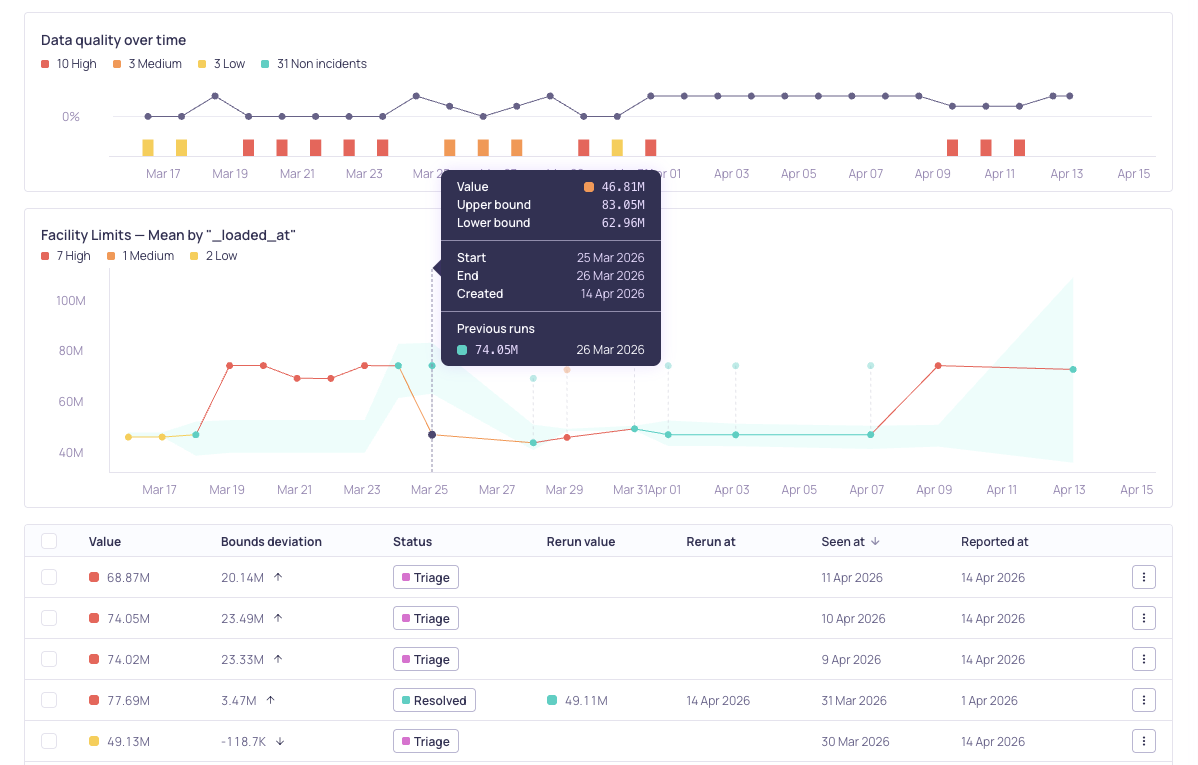
Metric graph and incident list updates after a rerun completes
You can now rerun validators to re-execute validation on recent data while preserving all existing metrics, incidents, and audit history. This non-destructive action is designed for verifying data fixes after remediation — particularly useful where a complete audit trail is required.
- Rerun individual validators from the Validators page, Source Validators tab, or Validator details page. On the metric graph, click a specific datapoint to rerun from that window. A confirmation dialog lets you include related validators that share the same pipeline configuration. See Managing Validators.
- Rerun all validators on a source from the Sources page or Source details page to re-execute all eligible validators at once. See Managing Sources.
When a rerun completes, the new metric value is stored alongside the original. If the rerun value falls within the configured bounds, the incident is automatically resolved. Rerun history is visible in the metric graph tooltip and the incidents list.
AI Lineage Edge Suggestions
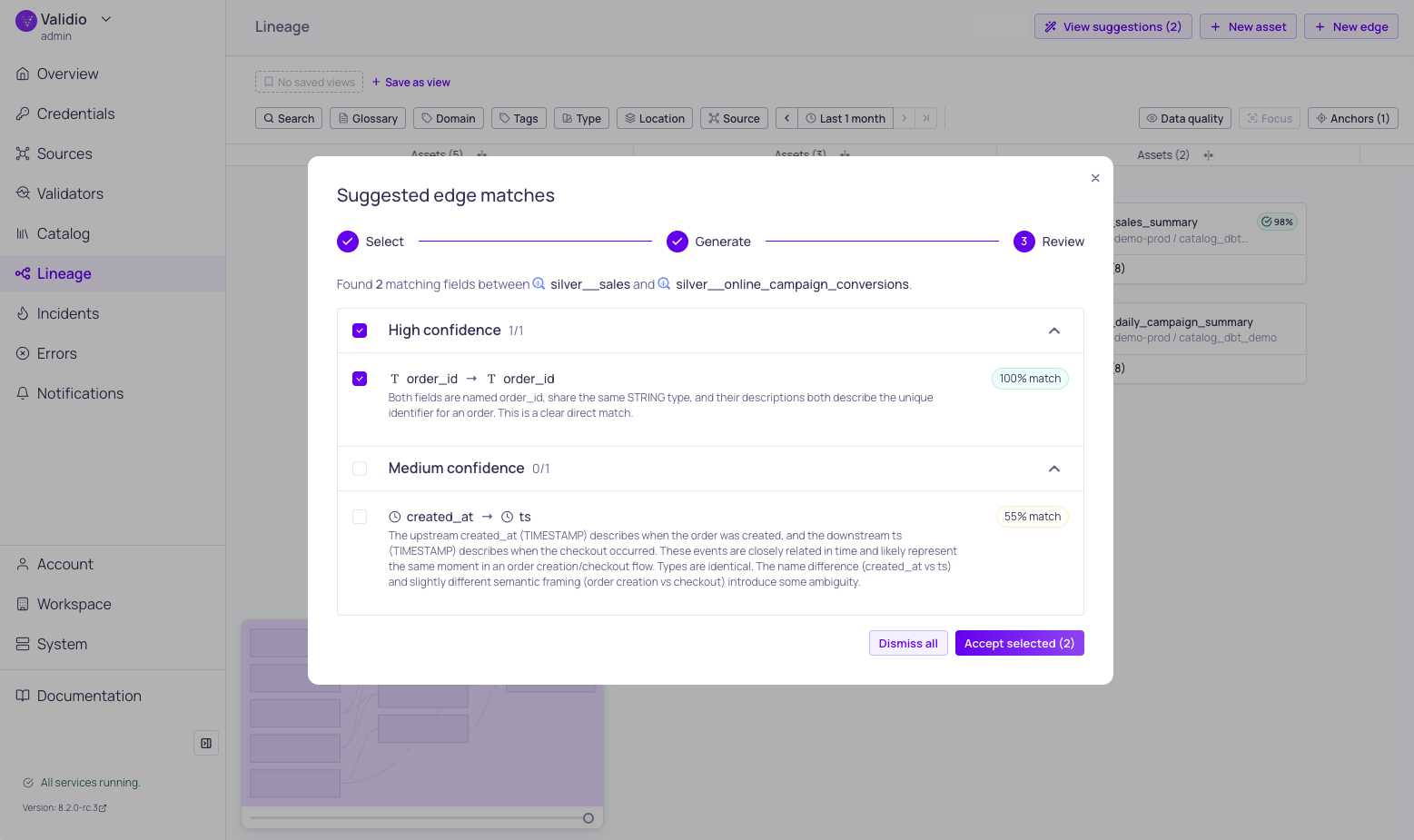
Suggested edge matches
You can now use AI-powered matching to automatically suggest field-level lineage connections between assets from different systems. The Suggest Edges workflow combines fast heuristic rules with optional LLM refinement to find matches even when field names differ — handling casing, abbreviations, naming conventions, and semantic equivalents. Suggestions are grouped by confidence level (high, medium, low) with explanations, so you can review and accept the right matches.
An LLM credential is optional but recommended for deeper semantic analysis. For details, see Suggest Lineage Edges in our product documentation.
AI Description Generation
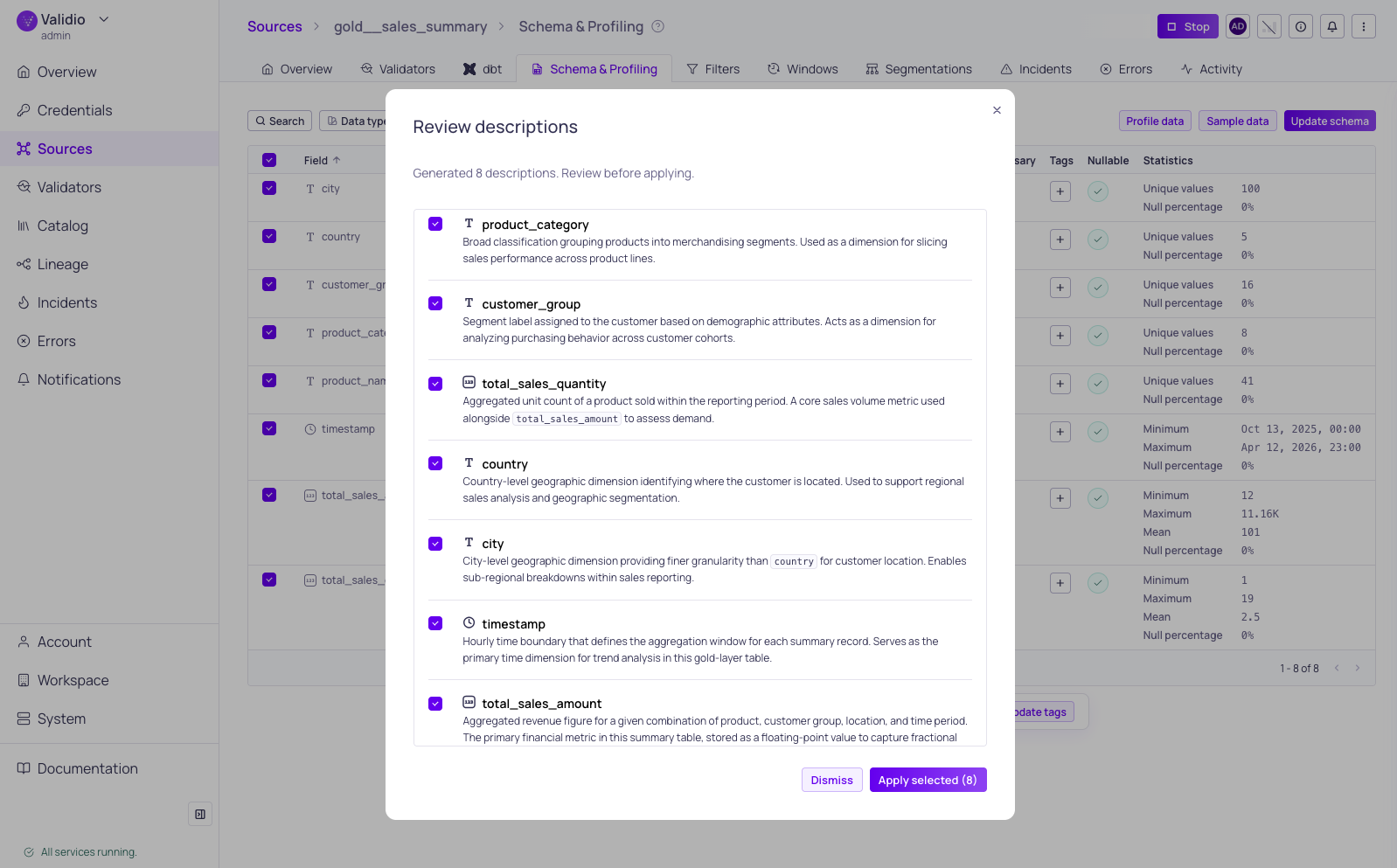
Generated descriptions for schema fields
You can now use AI to generate descriptions for catalog assets, schema fields, glossary terms, domains, validators, and lineage edges. The AI analyzes available metadata — such as schema information, glossary terms, tags, and lineage context — to produce tailored descriptions. A bulk generation option lets you describe multiple schema fields at once, with a review dialog to select which descriptions to keep. Generated descriptions use markdown formatting and can be refined in the built-in editor before saving.
Requires AI features and an LLM credential to be configured. For details, see AI Description Generation in our product documentation.
OpenLineage Integration
Validio now supports ingesting lineage events from OpenLineage-compatible tools such as Apache Airflow, Spark, and dbt. Point your OpenLineage producer at the Validio endpoint, and Validio automatically creates catalog assets, establishes lineage relationships, and imports dataset metadata from incoming events.
For more details, see OpenLineage in our product documentation.
Teradata Integration
You can now connect Validio to Teradata for automated data quality monitoring. Set up a read-only service account, configure a credential, and add sources to validate your Teradata data. The integration supports catalog discovery, lineage, custom SQL sources, and all standard Teradata data types.
For details, see Teradata in our product documentation.
Record Match Count Validator
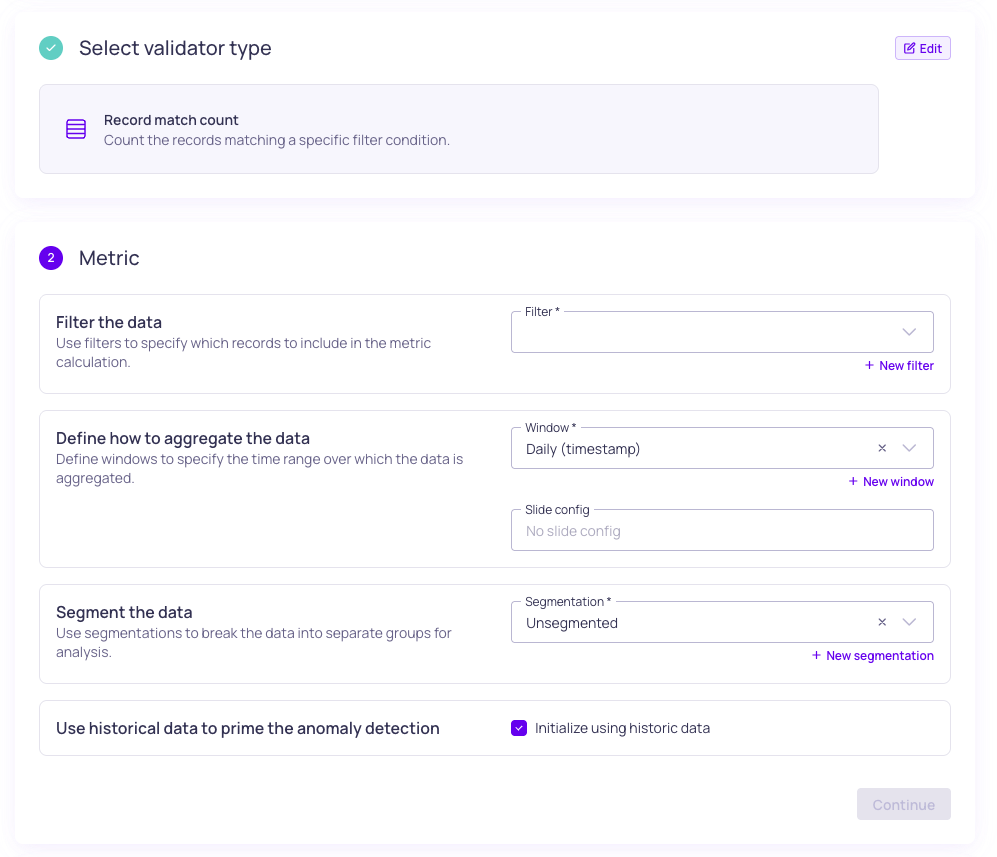
Record match count validator metric configuration
A new Record Match Count validator type is available under Metrics & Validity. Use it to count the records matching a specific filter condition — for example, monitoring how many orders have a status of "failed" or how many records contain a particular flag.
For details, see Record Match Count in our product documentation.
8.2.4
Validio 8.2.4 was released on Thursday 7 May 2026.
Fixed Issues
- Fixed issues with z/OS catalog query support for IBM Db2 (VR-5451)
- Enabled Dynamic Threshold V1 to V2 migration by default (VR-5459)
- Fixed issues with promotion of propagated glossary terms to direct terms (VR-5458)
- Anchored timestamps to UTC for IBM Db2 on z/OS (VR-5471)
Features & Updates
- Added support for IBM Db2
TIMESTMPdata type (VR-5468)
8.2.3
Validio 8.2.3 was released on Wednesday 29 April 2026.
Fixed Issues
- Fixed duplicate asset scans during Teradata catalog refresh (VR-5428)
8.2.2
Validio 8.2.2 was released on 24 April 2026.
Fixed Issues
- Fixed a bug that caused the model to create decision bounds where the upper bound was below the lower boundary (AL-689)
- Fixed a bug that caused overflow in the dynamic threshold changepoint detection algorithm (AL-688)
- Added parser support for volatile/temporary tables (VR-5423)
- Resolved N+1 query issues in LineageEdge by implementing batch loading for sqlQuery fields (UI-6198)
- Modified IBM DB2 configurations to make the backend type and database name immutable once created (UI-6202)
Features & Updates
- Implemented rank for sorting on search (UI-6092)
8.2.1
Validio 8.2.1 was released on 22 April 2026.
Fixed Issues
- Allow psuedocolumns in data profiling and sampling (VR-5403)
- Use case-insensitive email matching for user lookup (UI-6180)
- Allow cross-origin embedding of incident graph images (UI-6182)
- API: Remove lineageEdge specific tag endpoints (UI-6165)
- Restore Debug button on validator page (UI-6195)
- Display source system label in catalog sidebar (UI-6197)
Features & Updates
- Omit Maximal segment use when equal to Extreme (PL-4253)
8.2.0
Validio 8.2.0 was released on 21 April 2026.
Fixed Issues
- Fixed an issue with multi-field description dialogs (UI-6119)
- Fixed performance issues with data quality queries (UI-6041)
- Fixed catalog asset page errors on dbt placeholder assets (UI-6044)
- Fixed missing activity logging for credentials (UI-6054)
- Fixed query performance for incident group activity (UI-6049)
- Fixed double-quoted identifiers in segmentation (UI-6061)
- Fixed incident status menu (UI-6036)
- Removed source details in validator wizard (UI-6022)
- Disabled data field setting when Custom SQL is active (UI-6075)
- Ensure
source_fieldsonly used by percentage volume validators (UI-5851) - Prevent disabled menu items from triggering actions (UI-6072)
- Improved handling of 404 redirects when user is logged out (UI-6074)
- Removed legacy update schema wizard (UI-6020)
- Removed broken segmentation field from validator types (UI-6093)
- Display when debug queries time out (UI-6073)
- Fixed partial updates for credentials (UI-5998)
- Fixed no data (empty) state for validators (UI-5888)
- Removed dangling filter references from AI recommendations (UI-6087)
- Improved data preview table navigation (UI-6121)
- Hide profiling lookback filter when there are no timestamp fields (UI-6128)
- Show query error in filter preview instead of empty state (UI-6130)
- Fixed incorrrect weekday display in cron expressions (UI-6133)
- Fixed last incident time calculation for global window (UI-6140)
- Fixed group-by handling in debug queries for ClickHouse (VR-5369)
- Added support for ClickHouse clusters for query history (VR-5361)
- Filter out empty schemas (users) for Oracle (VR-5346)
- Improved observability for Oracle (VR-5356)
- Ensured column length and data size for Oracle (VR-5367, VR-5370)
- Fixed broken lineage test for Oracle (VR-5393)
- Fixed issue to prevent duplicate error icons in Sources list on search (UI-6170)
Features & Updates
- Added custom range option to time range filter (UI-6139)
- Added support for rerunning sources and validators (UI-6025)
- Added support for Teradata credential and source configurations (UI-6027, 6135)
- Added time-bounded pagination for Overview page Activity logs (UI-6040)
- Added support for tags for schema fields and lineage edges (UI-6045)
- Added support for adding/updating schema fields on a generic asset (UI-6016)
- Added a new Custom Validation (renamed to Record Match Count) validator (UI-5526)
- Added bulk selection and Mute column to Sources page (UI-6069)
- Added description generation agent for entities (UI-6088)
- Added support for improved data quality calculation (UI-6051)
- Added API support for descriptions and updating lineage edges (UI-6077)
- Added fuzzy lineage matching for cross-system (UI-6008)
- Added input validation for Namespace ID (UI-6112)
- Added function to determine if Dynamic Threshold state is okay (AL-684)
- Added support for Db2 license key (VR-5391)
- Updated LLM credential model lists and helper text for custom models (UI-6047)
- Implemented customizable column widths for tables (UI-4532)
- Improved handling of profiling timeouts for recommendations (UI-6052)
- Updated Oracle credential to use service, instead of database (UI-6123)
- Preserve column order in SQL source preview (VR-5397)