

New role-based access controls
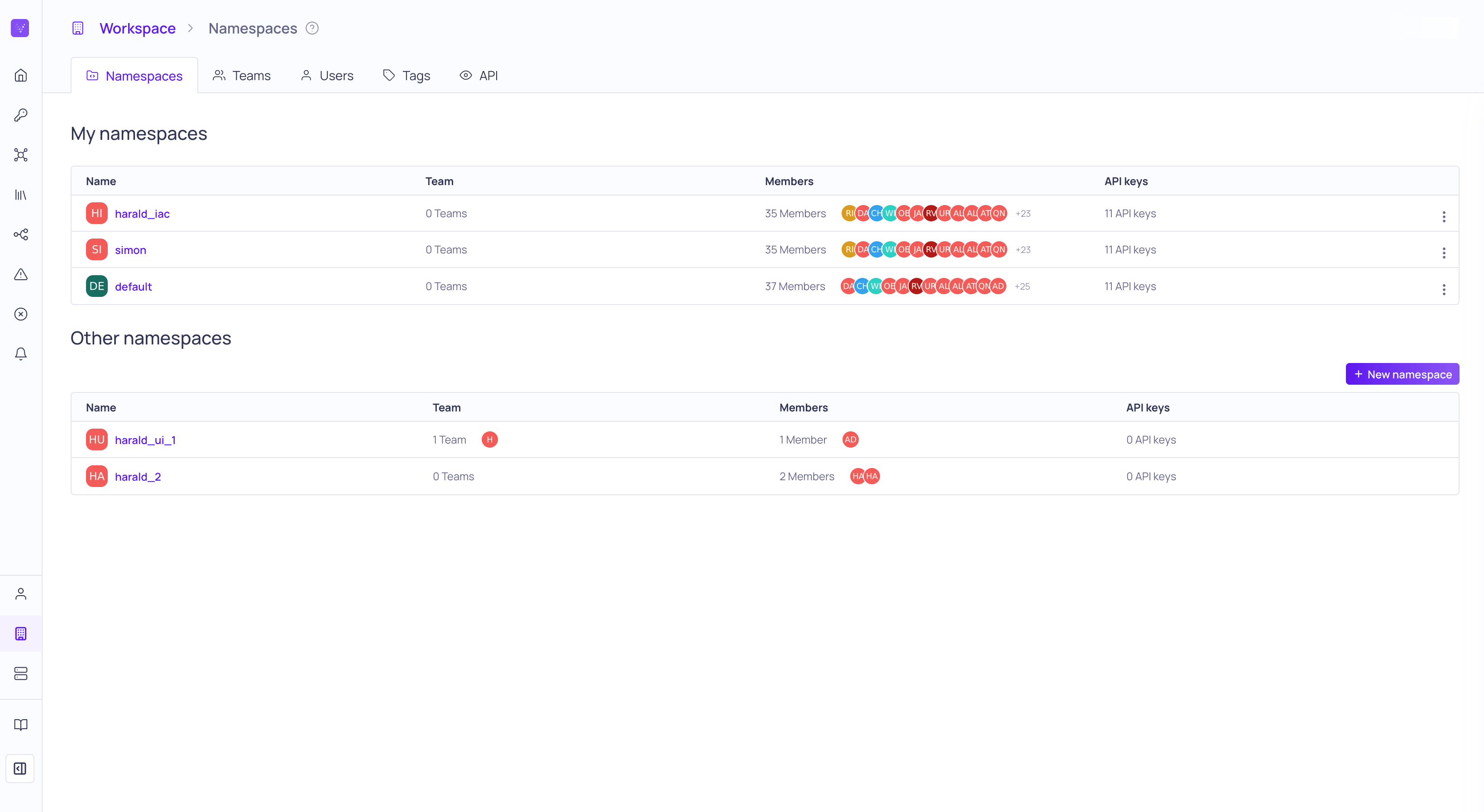
- Teams let you group users together around business units or areas of responsibility within your organization. Each team can configure and manage their own resources separate from other teams.
- Namespaces let you separate resources into isolated groups that you can manage independently of each other. Teams can only access the resources that are in their assigned namespaces. For example, individual teams can see their data quality without it being affected by incidents that are happening in other teams.
- With namespace-level permissions, teams of users can manage their resources separately from other teams and access can be restricted.
- With global-level permissions, users can manage resources such as API keys, catalog assets, lineage, namespaces, tags, users, and teams. For example, everyone will be able to see global lineage, but only users with sufficient permissions can add or remove connections.
- In general, users will be able to see everything in the system that they have access to. For example, they will see all of the sources coming from any namespace that they have at least viewer access to.
Redesigned user experience
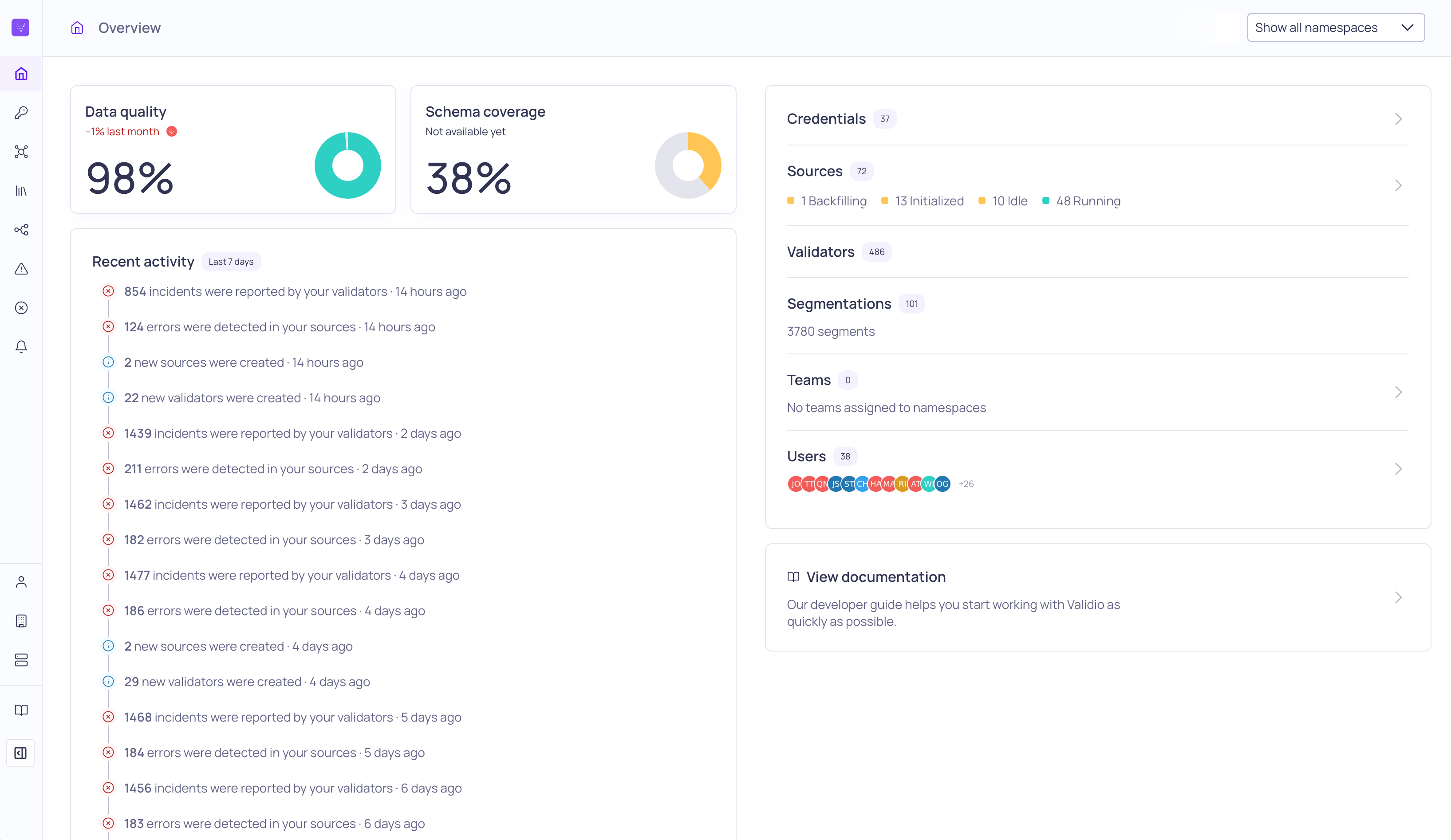
- Overview page—The Overview page is now shows more information about the status of your system and your configured resources. If you have access to more than one namespace, you can select to restrict the summary to a namespace. For more information, see About the Overview Page in the product documentation.
- Platform navigation sidebar—To help you focus more on the contents of the page, we now allow you to collapse or expand the navigation sidebar as needed.
- Breadcrumb and page descriptions—We removed the nested hierarchy of the pages to simplify their discovery. The breadcrumb now also includes a tooltip with helpful descriptions of the page.
- Settings—The settings pages have been separated into Account, Workspace, and System. For more information, see Settings in the product documentation.
20 September 2024
Fixed issues
- Fixed an issue to ensure that user metadata is correctly populating lists (UI-3977)
- Improved the performance when querying credential stats (UI-3973)
18 September 2024
API updates
Improvements
- Field
sourcewas replaced withsourcesonCatalogAssettypes (UI-3616) - Input field
globalRoleof typeRole!was added to input object typeUserCreateInput(UI-3616) - Input field
loginTypeof typeLoginType!was added to input object type UserCreateInput(UI-3616) - Added
sqlFilterVerificationAPI (UI-3958)
Removals
- Field
credentialwas removed fromCatalogAssettypes (UI-3616) - Input field
namespaceIdwas removed from input object typeValidatorRecommendationApplyInput(UI-3616) - Field
resourceNamespace(deprecated) was removed from all types (UI-3616) - Input field
resourceNamespace(deprecated) was removed from all input object types (UI-3616) - Field
namespaceIdwas removed from typesIdentity ProviderandUser(UI-3616) - Mutation
identityProviderNamespaceUpdate(deprecated) was removed (UI-3616) - Mutation
userNamespaceUpdate(deprecated) was removed (UI-3616) - Query
channels(deprecated) and queryusers(deprecated) was removed (UI-3616) - Fields
namespaceIdandrolewas removed from object typeUser(UI-3616) - Role values ANONYMOUS, GUEST, SUPER was removed from enum Role (UI-3616)
User interface updates
Improvements
- Added RBAC support on namespaces. (UI-3616)
- Added support for multiple originFields in RCA and Custom SQL and Volume validators (UI-3664)
- Added more inline documentation with tooltips in page breadcrumbs (UI-3817)
- Added support for batch updates of incident group status (UI-3465)
- Simplified User and Identity provider setup (UI-3802)
- Added more comparison information in sidebar of relative time validators (UI-3556)
- Added support for dbt Cloud credentials to be refreshed with catalog refresh (UI-3857)
- Added segment information in RCA view (UI-3404)
- Added help-text to threshold forms to describe the configured alert trigger conditions (UI-3901)
Fixed issues
- Removed deprecated PubSub subscription APIs (UI-3887)
- Ensure bucket size for fixed batch windows is at least 1 second (UI-3538)
- Ensure wizards steps are scrolled into view (UI-3897)
- Fixed an issue with presets when updating thresholds (UI-3845)
- Force same window as source for reference source in validator wizards (UI-3791)
- Fixed the count on validators list tag filter (UI-3927)
- Fixed an issue with select and deselect labels in Update Tags dialog (UI-3938)