

Changelog 7.4
Validio 7.4 introduces new roles for more granular access controls and improvements to search and filtering.
New Roles & Access Controls
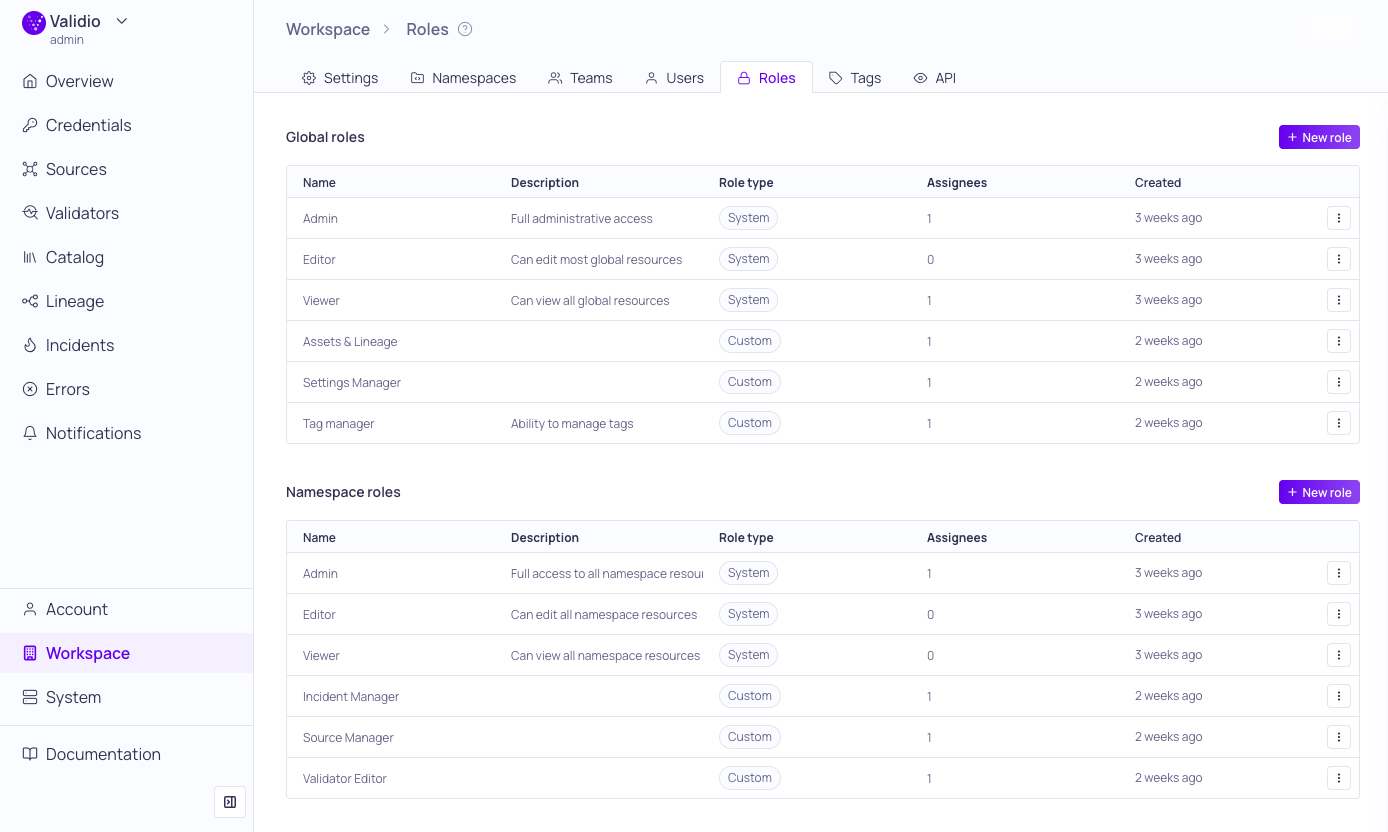
New Roles Management page
Validio 7.4 introduces permission-based Roles to provide granular control over user access across global and namespaced resources. To balance broad accessibility with tight security, roles are divided into two types:
- System Roles: These are the standard, predefined roles--Admin, Editor, and Viewer. They provide broad access levels, ranging from full administrative control to read-only access, and cannot be modified.
- Custom Roles: These allow you to define combinations of
READandWRITEpermissions for individual resources, to meet specific, granular security requirements.
Custom roles enable you to follow the Principle of Least Privilege, ensuring users have only the minimum access required for their tasks. For example, while workspace settings typically require a Global Admin (with full write access across the platform), you can now create a "Settings Manager" custom role configured with WRITE permissions for Settings while remaining READ-only for all other resources.
To learn more about implementing RBAC and configuring permissions, see About Validio RBAC and Managing Roles in our product documentation.
Improvements to Search & Filtering on Sources
Validio 7.4 introduces powerful search and filtering enhancements to the Sources page, alongside a streamlined workflow for managing customized views.
- Advanced Filter Logic: You can now filter for values that are Any of or None of a selected set. When selecting multiple values within a filter, the system automatically applies OR logic to broaden your results.
- Intuitive Saved Views: Preserving your workspace is now faster. After applying your desired search queries, sorting, and filters, simply click + Save as View. Name your view, and set its visibility to keep it private or share with your organization.
Saved Searches are now Saved Views: Starting with Validio 7.4, "Saved Searches" have been renamed to Saved Views. We are currently rolling out an updated UI to support this change. You may notice a different interface on the Sources page compared to the Validators and Incidents pages as we finalize the transition across the platform.
For more information, see Customizing and Saving Views in our product documentation.
Validator Migration to Dynamic Thresholds V2
Starting with Validio 7.4, all validators in your environment using the V1 version of Dynamic Thresholds will automatically migrate to using V2.
This rollout will occur in phases; your specific environment may be updated at a different time than others. No action is required on your part.
Dynamic Thresholds V2 was introduced in Validio 5.1 and became the default algorithm for new validators in Validio 6.0. This upgrade delivers more precise and reliable anomaly detection that adapts to your data's unique patterns, providing the following key benefits:
Enhanced Anomaly Detection Engine
- High-efficiency architecture: New memory-optimized design for real-time anomaly detection.
- Refined edge-case logic: Better handling of zero-values and sparse data sets.
- Resilient learning: Stronger default logic for adapting detection bounds to new data points.
Intelligent Level-Shift Detection
- Dynamic baseline adaption: Automatically distinguishes between true trend shifts and temporary noise.
- Noise reduction: Smarter handling of rapid shifts and reversions to reduce false alarms.
- Sequential tracking: Reliable follows multiple consecutive baseline shifts in high-volatility environments.
- Automatic recalibration: Instant adjustment following system changes, such as feature rollouts or configuration updates.
Adaptive Bounds
- Precision guardrails: Bounds now tighten more precisely around incidents.
- Volatility control: Reduced thresholds from becoming too wide, ensuring stability even after periods of high variance.
Improved Freshness Detection Accuracy
- Elimination of false negatives: Unlike V1, V2 ensures that late or stale data is always identified.
- Reliable alerting: Alerts are more consistently tied to genuinely stale data.
- Per-segment Thresholds: For segmented validators, you may see high initial volumes if individual segments update infrequently. To maintain a clean incident feed, we recommend filtering out known-stale segments or those with non-critical update schedules.
V2 Freshness Validators use deterministic logic that adapts to your data's unique cadence and systematic shifts (such as seasonality). While this leads to higher precision, you may notice an increase in incidents on historically stale data sources. This is an intentional improvement to ensure that you are alerted whenever data is late, rather than potentially missing stale data issues.
For more information, see Configuring Dynamic Thresholds .
7.4.2
Validio 7.4.2 was released on 23 January 2026.
Fixed Issues
- Fixed an issue that prevented you from selecting any option other than "No filter" when creating segmentations (UI-5754)
- Added Kubernetes resource requests and limits to init containers (PL-3897)
- Implemented consistent power law behavior in dynamic thresholds for Numeric and Count validators to better accommodate time series with "fat-tailed" distributions, significantly reducing false-positive alerts (AL-638)
7.4.1
Validio 7.4.1 was released on 21 January 2026.
Fixed Issues
- Improved User and RBAC performance (UI-5738)
- Fixed an issue to ensure that unsaved filters are persisted (UI-5741)
- Fixed an issue where JSON strings from the MCP client were failing to parse into objects (UI-5740)
7.4.0
Validio 7.4.0 was released on 19 January 2026.
Fixed Issues
- Fixed an issue with OAuth configuration for Databricks credential and set the refresh token TTL to 30 days (VR-5113, UI-5732, UI-5727, UI-5590, UI-5711, VR-5086)
- Fixed an issue where saved search IDs from route were not triggering the correct filter (UI-5735)
- Fixed the empty state for non-backfill validators and the name input for creating validators (UI-5728)
- Fixed an issue to automatically create a tumbling window when creating DBT sources (UI-5523)
- Fixed an issue to ensure that the time filter is not disabled when previewing segmentations (UI-5721)
- Fixed an issue to ensure that time field selection defaults to the first value (UI-5704)
- Fixed an issue with updating tags across multiple pages (UI-5670)
- Fixed an issue with comments in the Activity log (UI-5698)
- Fixed an issue where a button was disabled when creating Enum filters (UI-5695)
- Fixed an issue to improve the empty state behavior of Validator detail pages (UI-5698)
- Fixed an issue to ensure the "Last used" column gets updated in the API Keys table (UI-5677)
- Implemented GraphQL related limits (UI-5643)
- Fixed error handling during catalog refresh for Databricks (VR-5065)
- Implemented requirement for SSL in Redshift connections (VR-5086)
New Features & Updates
- Expanded RBAC with new Roles configuration (UI-5584)
- Improved filtering, searching, and saving views (UI-5309)
- Added analytics to filter, sort, and saved views (UI-5716)
- Added support for CA certificates for SMTP servers (UI-5703)
- Backfill by default when replacing a validator (UI-5707)
- Allow you to select timestamp fields formatted as STRING datatypes (UI-5681, VR-5057)
- Added support for TLS when configuring Oracle credentials (UI-5620)
- Added create new validator option at the end of the validator creation flow (UI-5656)
- Allow you to enter a Name for validator batch creation with a single field (UI-5691)
- Added ID to resource information in sidebar (UI-574)
- Implemented removal of influential points in level shift (AL-635)
- Added
INITstate for validators to indicate when the initial polling is complete (VR-5047)