

Changelog 11.2
Validio 11.2 introduces catalog approval workflows, row count metadata validator for SQL Server sources, and improved anomaly detection for step-like metrics.
Catalog: Approval and archival workflows
Catalog changes can now require a second person's approval before they take effect, just as namespaced resources already can. This covers glossary terms, domains, classifications, catalog assets (including their schema fields and glossary term assignments), and lineage edges. When the setting is on, every catalog change is saved as a draft, submitted for review, and approved by someone who holds the matching Approve permission. Changes that belong together, such as a new domain, a term in it, and an asset that uses the term, are submitted together and can be approved in one step. Every step is recorded in the activity log.
Turn it on under Workspace > Settings > Catalog approval workflow. Domains now have their own permission, and global roles can grant Approve on Business Glossary, Domains, Classifications, Catalog Assets, and Lineage. Keep the setting off if you manage the catalog through infrastructure as code (IaC), because API keys cannot stage or approve catalog drafts.
Domains, glossary terms, classifications, and manually created assets can now also be archived and unarchived, whether or not approval is enabled. A new Edges tab on the Lineage page lists every lineage edge, with its origin, tags, and review state.
See Catalog Approval Workflows.
SQL Server: Row count metadata validator
SQL Server sources now support the Row Count (metadata) validator. It reads table row counts from SQL Server's own statistics instead of querying your data, so you can watch volume on many tables without adding load to the database.
Add it from the Validators step when you create a SQL Server source from existing tables, when you convert SQL Server catalog assets to sources, or from the validator picker on an existing source. Freshness (metadata) remains available only for BigQuery and Snowflake.
See Metadata Validators.
Dynamic thresholds: Fewer alerts on step-like metrics
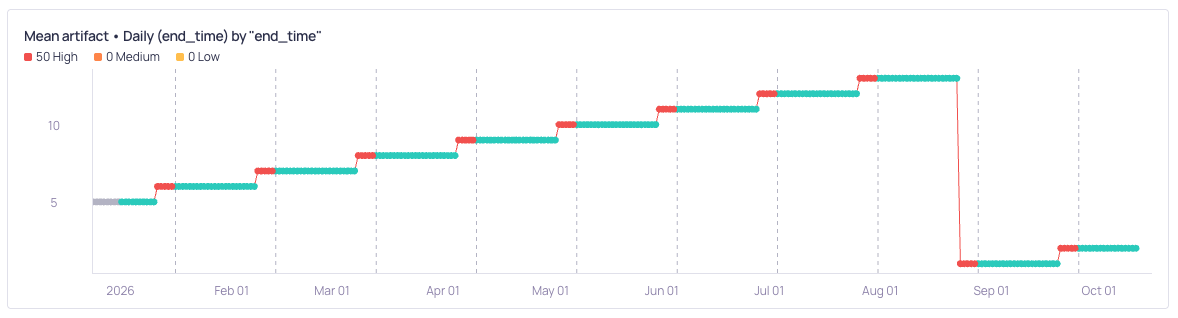
Piecewise anomaly detection (before)
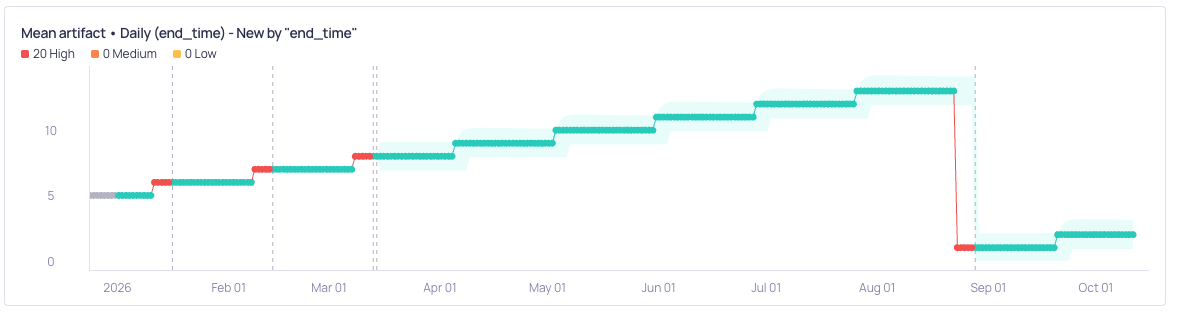
Piecewise anomaly detection (now)
Dynamic thresholds now recognize metrics that move in steps, known as piecewise constant metrics, such as a count that stays flat and then jumps to a new level. Validio now learns how large the routine steps usually are and widens the threshold to tolerate them. A step much larger than usual still raises an incident, and the metric's new level then becomes the baseline.
This works automatically on validators that use dynamic thresholds, with no configuration needed. Validio starts treating a metric as step-like once it has enough history, at least 30 data points, and stops when the metric no longer moves in steps. Metrics with a seasonal pattern and metadata volume validators keep their existing models. The sensitivity setting still controls how much variation is tolerated.
See Incident Detection with Dynamic Thresholds.
11.2.0
Validio 11.2.0 was released on 15 October 2026.
New features
- SQL Server table and column descriptions and tags are now read into the catalog from extended properties (VR-5956)
- Filter validators by whether they are muted (UI-7899)
- Filter sources by error type (UI-8520)
- The activity log now shows what changed when a resource such as a source is updated (VR-5898, VR-5981)
- AI assistants connected through the Validio MCP Server can now get an incident's debug query, and every get and list tool now returns a link to the resource in Validio (UI-8625, UI-8474)
- Incident group links now show the segment the incidents belong to (UI-8638)
Improvements
- The Slack integration form now explains where to find the bot and app tokens (UI-8433)
- Incident summaries now show the value and its difference from the expected range separately (UI-8477)
- Searching schema fields in lineage is faster, and abandoned searches no longer keep running (UI-8592, UI-8554, UI-8324)
- Descriptions in the public API schema are now complete and up to date, for example for
Namespace.approvalWorkflowsEnabled(UI-8626)
Fixed issues
- Graph tooltips and Slack notifications now format a value and its bounds together, so numbers that are close no longer look the same, including bounds near zero (UI-8544, VR-6005, VR-5989)
- Debug queries and raw record previews on SQL Server sources no longer fail on binary columns or columns with unsupported types (VR-6002, VR-6004)
- SQL Server
timestamp(row version) columns are now cataloged as unknown instead of as a date, which also stops profiling from failing on them (VR-6003) - Numeric metrics on SQL Server sources are now computed with full precision (VR-5948)
- BigQuery jobs are now cancelled when Validio stops waiting for them (VR-5952)
- Lineage is now built for Oracle queries that use
CAST(MULTISET(...))(VR-5992) - OpenLineage datasets with two-part names are now matched to ClickHouse catalog assets (VR-5994)
- The lineage glossary term filter now matches tables whose matching field is beyond the first 100 fields (UI-8276)
- Suggest edges on the glossary page no longer times out at the Matching text step (UI-8558, UI-8552)
- Archived validators now appear in the Archived view when approval workflows are off (UI-8015)
- The metric page no longer shows no data after a backfill (UI-8585)
- The metric graph stays on screen while a validator receives frequent updates (UI-8431)
- Data previews show array values and sample data values as JSON, and keep large integers exact (UI-8392, UI-8456, UI-8413)
- Users with Write on Validators can now set the dimension in the validator wizard (UI-8577)
- Editing a notification rule now requires the Notification Rules Write permission (UI-8455)
- Namespace Admins now see member grants and revokes for their namespace in the activity feed (UI-8586)
- A set application URL can no longer be cleared (UI-8029)
- The markdown editor no longer waits for syntax highlighting to load before you can type (UI-8091)
Removals
- The
Roleenum and theglobalRoleandrolefields, deprecated in 7.4.0, are removed from the public API. UseglobalRoleConfig,assignedGlobalRoles, androleConfiginstead (UI-6562)