

Changelog 11.0
Validio 11.0 introduces approval workflows for protected namespaces.
Approval workflows: Review for protected namespaces
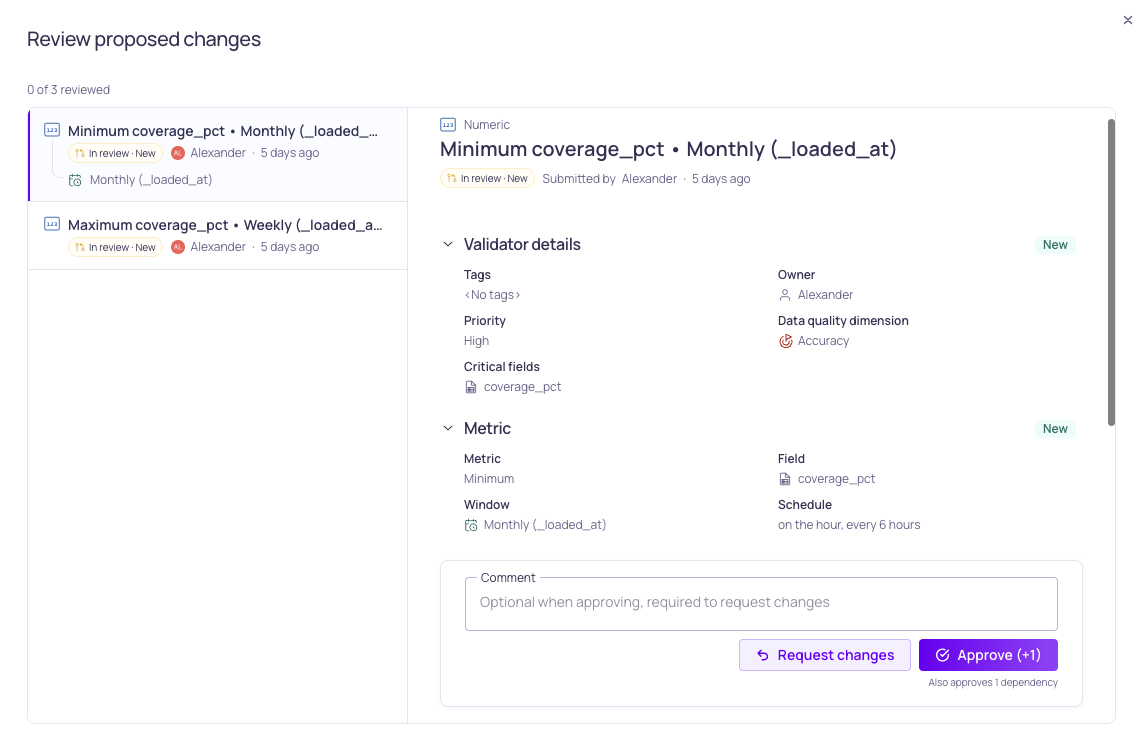
Review new validators added to the protected namespace
Approval workflows add a second pair of eyes to the namespaces where data quality matters most. Turn the setting on for a namespace in Workspace > Namespaces, and grant the new Approve permission to your reviewers. Every change to a source, validator, filter, window, or segmentation in the namespace is staged as a draft until a second person approves it.
The live resource keeps running untouched, and review can't be bypassed — direct changes are refused from the UI, the API, Validio Code, and AI assistants alike. Every approval is recorded in the activity log, so an audit shows both people behind each change.
Enabling is prospective, so published resources keep running and nothing needs re-approving. Leave it off for namespaces you manage with infrastructure-as-code, since protected namespaces refuse direct API changes. Approval notifications aren't sent yet — reviewers should check the new In review view.
Learn more in Approval Workflows.
11.0.3
Validio 11.0.3 was released on 1 October 2026.
New features
- Download Validio’s SAML service provider metadata file to set up single sign-on with your identity provider (UI-5515)
- Page through every lineage relation with the new beta
lineageEdgesAPI query. You can filter by origin, by asset or field level, by asset, and by last update time (UI-7962) - MCP clients such as Claude now show the Validio name and icon on the connector (UI-8154)
Improvements
- A credential you create from the source wizard is now selected automatically (UI-6826)
- Dynamic thresholds now recognize recurring month-end patterns more reliably (AL-753)
Fixed issues
- The validator summary now matches the Is not in operator instead of saying the field contains one of the values (UI-8155)
- Lineage links and pasted lineage URLs now open on the assets they point to, and removed lineage anchors no longer come back until a new session (UI-8121, UI-8111)
- A selected filter value stays in the filter menu when no rows match it, so you can still clear it (UI-8088)
- Clicking a row in the Model runs list on a source’s dbt tab no longer opens an error dialog (UI-8033)
- A failed validator recommendation run now shows the reason in the progress popover (UI-8097)
- Validator recommendations work again with Claude Opus 4.8 on Amazon Bedrock (UI-8167)
- Lineage relations now keep their most recent SQL query and update time when older query history is reprocessed (VR-5945)
- Fixed wording errors in the public API schema descriptions, including the description of the validator list’s default lifecycle filter (UI-8023, VR-5959, UI-8047)
11.0.2
Validio 11.0.2 was released on 25 September 2026.
New features
- Cancel a running SQL test or preview in the SQL source, SQL validator and SQL filter editors. Cancelling also stops the query in your warehouse, so a mistaken or expensive query doesn’t run to the end (UI-7428)
- Create a validator and start its source backfill in one step with the new Create and backfill button at the end of the validator wizard. The button appears when Initialize using historic data is on (UI-7902)
- Rerun reconciliation validators, like other validator types (UI-7817)
Improvements
- The SQL editor now suggests each warehouse’s own keywords, types and functions, instead of the same short list of generic keywords for every dialect (UI-7870)
- The incidents lists now have an add-filter menu. The Location, Validator type, Validator and Segmentation filters moved into it, which leaves the toolbar for the filters you use most (UI-7935)
- The credential side panel now shows Use for catalog, and a tooltip explains what it means (UI-7773)
- The integration form now explains that interactive messages add a metric graph and interactive controls to each message (UI-7826)
- Catalog refresh no longer repeats the asset refresh for credentials that connect to the same system with identical settings (VR-5933)
- MCP tools now declare that they only reach the Validio API, and write tools declare whether it’s safe to repeat a call. Assistants can use this to decide when to ask you to confirm (UI-7876)
Fixed issues
- Validator recommendations now follow your guidance notes at every step. Asking for one kind of check, such as empty strings on a global window, returns only that kind of check (UI-7969)
- Applying recommendations no longer stops at the first refused validator. The rest are still applied and each refusal is reported (UI-7884)
- Validator recommendations no longer suggest a validator on the same field it’s segmented by (UI-7986)
- The validators CSV export now respects the Dimension, Critical fields, Priority and approval filters, so it contains only the validators the list shows (UI-7906)
- Windows, filters and segmentations in review now offer the Review action in the approval chip tooltip and the row menu (UI-8006)
- The lineage graph now shows a truncated graph, not an empty one, when an asset has more direct relations than the display limit (UI-7961)
- OpenLineage events where a dataset is both an input and an output are now accepted. The self-reference is ignored and the rest of the event is kept (VR-5633)
- A failed namespace delete, API key creation or catalog refresh now shows the reason in the dialog, instead of failing silently or showing Error: [object Object] (UI-7167, UI-7166, UI-7157)
- The MCP list tools and summarize-incidents now return a default page that fits within the response size limit, instead of failing with “Result too large” (UI-7987, UI-7996)
Deprecations
- Snowflake user and password authentication is deprecated. You can’t create a new Snowflake credential with it or switch an existing credential to it. Use key-pair or programmatic access token authentication instead (VR-5936)
11.0.1
Validio 11.0.1 was released on 23 September 2026.
New features
- Separate
graphql-queryandgraphql-mutateMCP tools replace the single freeformgraphql-executetool, so read requests are clearly separated from writes (UI-7522, UI-7873) - Export every glossary term assignment as CSV from the CSV Export API, including propagated assignments, with one row per assignment (UI-7917)
Improvements
- MCP tools now declare whether they only read data, so connected assistants no longer ask you to confirm every read-only call (UI-7522, UI-7872)
- MCP tool responses are now size-bounded, so a large result comes back trimmed with guidance instead of being cut off by the client (UI-7523)
- Muting a resource and the full MCP tool list are now discoverable from the MCP server (UI-7524)
- MCP tool descriptions now fit the 1,024-character limit some clients enforce, so no description is silently truncated (UI-7874)
- The MCP server instructions now describe how list and create results are shaped, so assistants get them right more often (UI-7528)
- MCP errors now state the GraphQL document limits and say which limit a request hit (UI-7606)
- The MCP server now validates the Origin header on incoming connections, as the MCP specification requires (UI-7859)
- The public API now returns the actual GraphQL validation error instead of a generic "Invalid query" (UI-7905)
- The window type filter on the validators list moved into the add-filter menu, leaving the toolbar for the filters you use most (UI-7799)
- Filter validators by priority, and sort the validators list from any column header (UI-7866)
- Resize the columns in the Glossary list so long term names stay readable (UI-7764)
Fixed issues
- Saved views keep the Dimension and Critical fields filters, and duplicate field names in the Critical fields filter are no longer ambiguous (UI-7789)
- A required field you have not visited now blocks form submission instead of letting the form through (UI-7613)
- Opening a namespace no longer shows a glitch that only a page refresh cleared (UI-7708)
- Selecting a field in the Root cause lineage graph no longer freezes the tab (UI-7927)
- Hiding a lineage node's field controls while its field search is open no longer crashes the page (UI-7911)
- Searching the Glossary list no longer raises a spurious "An error has occurred" dialog (UI-7938)
- The SQL editor now applies each dialect's own comment, quoting, keyword and function rules, so valid SQL is no longer flagged as an error (UI-7869, UI-7871)
- Incident root cause analysis over MCP no longer names a downstream incident as the root cause, and can name the incident itself (UI-7776)
- Recommended validators now include the segmentation's fields in SELECT and GROUP BY (UI-7831)
- Recommended validators on a global window no longer fail to apply because of an unresolved window placeholder (UI-7883)
- Fixed two server errors that returned a failed response to MCP callers (UI-7529)
- The activity log no longer reports an incident as resolved after a rerun that left it in triage (VR-5890, UI-7851)
- Duplicate column names produced by a join are now detected when a SQL source is created, instead of surfacing later as an error when you create a filter (VR-5670)
- Lineage built from OpenLineage now includes the table-level relation implied by a field-level one (VR-5927)
- Integer columns in a Postgres SQL source are no longer reported as not inferable (VR-5929)
Removals
- The MCP
graphql-executetool is removed, replaced bygraphql-queryandgraphql-mutate(UI-7873) - Ten hand-written MCP resources are removed, including Core Concepts, Validator Recipes, Validator Types, Validator Recommendations and the six entity resources. The generated GraphQL schema resources and the API patterns resource remain (UI-7903)
11.0.0
Released 16 September 2026.
New features
- Set a saved view as your personal default on any list (UI-6743)
- Filter incidents by validator (UI-6749, UI-6750, UI-7713)
- Filter sources by source system type, such as Snowflake, Databricks, or SQL Server (UI-7576)
- Filter validators by window type on the global Validators page (UI-5586)
- Create many-to-one manual lineage relations (UI-7459)
- Delete catalog assets through the API (UI-7409)
- Assign classifications when importing glossary terms from CSV (UI-7031)
- Remove a propagated glossary term assignment (UI-7283)
- Authenticate Jira Data Center with OAuth 2.0 authorization code (UI-7545, PIN-1645)
- Added the latest OpenAI models to the LLM credential model picker (UI-7538)
- Threshold feedback is now supported for the metadata volume model (AL-752)
Improvements
- Copy the SQL query behind a lineage node (UI-7407)
- Metadata metrics automatically carry the timeliness and volume data quality dimension badges (UI-7596)
- Credentials with cyclic dependencies can be transferred from the UI (UI-7707)
- MCP tool errors now explain what went wrong and how to fix it (UI-7527)
Fixed issues
- The SQL source update dialog scrolls long queries and no longer stretches the schedule field (UI-7806, UI-7752)
- Keyboard users can open a side panel from a list row (UI-7733)
- Screen readers no longer announce a decorative icon glyph before a button label (UI-7723)
- Lineage focus mode survives a page reload (UI-7433)
- The lineage info panel no longer drops a selection made while it was loading (UI-7268)
- Focus mode on fields works beyond the first page (UI-7551)
- Several lineage relations can be scrolled while they are being added (UI-7460)
- Glossary term propagation from the catalog schema view works again (UI-7571)
- Long column names are no longer cut off when propagating long glossary terms (UI-7458)
- A failed glossary term delete now shows an error instead of silently closing the dialog (UI-7703)
- Glossary term suggestions no longer exhaust memory on large catalogs (UI-7603)
- The Catalog stays on the page after a manual asset is deleted (UI-7217)
- The sources list shows data quality for the listed sources only (UI-7726)
- Adding and removing tags no longer requires tag write permission on targets that are not tags (UI-7376)
- A failed manager removal is reported in the dialog instead of a crash report (UI-7693)
- Fixed structured output failures with the Claude 5 models (UI-7615, UI-7644)
- Validator recommendations are no longer rejected by the model provider (UI-7600)
- Fixed number datatype inference for Snowflake custom SQL (VR-5916)
- Microsoft Teams no longer drops invocation requests (VR-5918)