

Exporting data as CSV
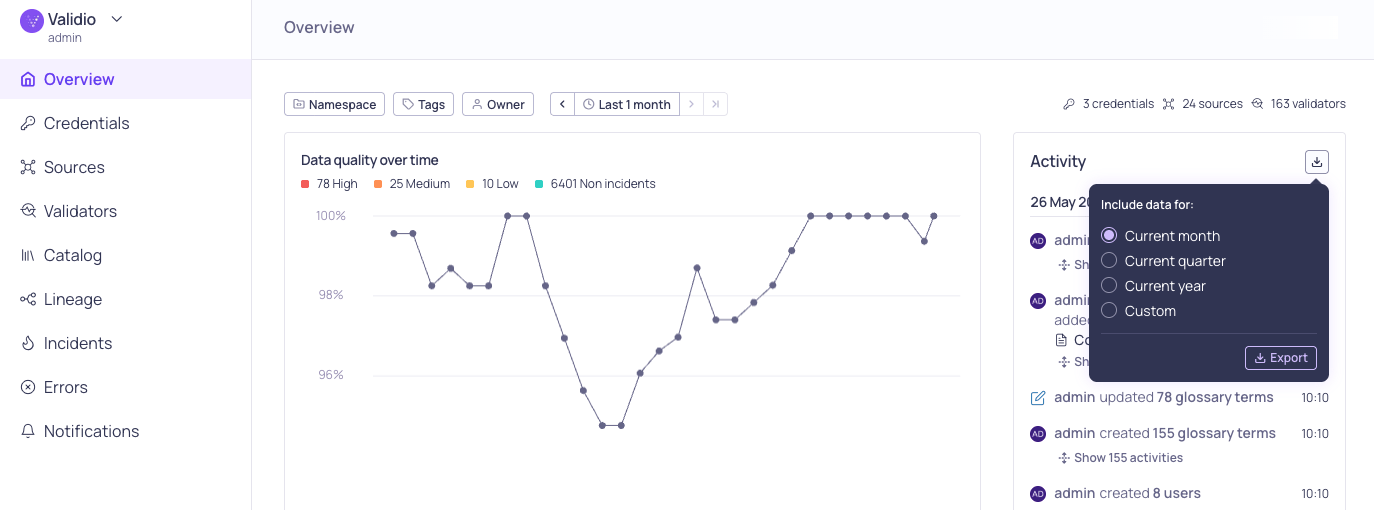
Export button on the Overview Activity log
- Sources, validators, and incident groups — full metadata with filtering and sorting that mirror the UI.
- Activity log — audit history with actor, action, and entity context. Entries for deleted resources keep their original names, so records like “user X deleted source Y” stay readable.
- Sample data and incident debug records — query results exported on demand, with columns determined at runtime.
- Filter and sort exports using the same field as the equivalent UI controls, including time-range bounds.
- Visibility is scoped by your permissions — each resource type appears only if your role or API key can read it.
- Endpoints are stateless GET requests, so you can schedule recurring exports with cron, Airflow, or any orchestrator to retain history beyond Validio’s retention window.
- Exports are capped at 100,000 rows per request; narrow the time range or split filters for larger pulls.
New integration: Progress OpenEdge
You can now connect Validio to Progress OpenEdge to monitor, analyze, and validate data in your OpenEdge operational database. Set up the integration by creating a read-only service account in OpenEdge, adding a Progress OpenEdge credential in Validio, and creating a source to monitor your tables. Known limitations — Due to constraints in the OpenEdge SQL engine, a few capabilities aren’t available for OpenEdge sources. Unsupported validators, metrics, and filter operators appear disabled with an explanatory tooltip. For setup instructions and limitations, see Progress OpenEdge.New integration: SAP IQ
You can now connect Validio to SAP IQ (formerly Sybase IQ) to monitor, analyze, and validate data in your SAP IQ database — a column-oriented database built for high-performance analytics and data warehousing. Set up the integration by creating a read-only user in SAP IQ, adding a SAP IQ credential in Validio, and creating a source to monitor your tables. For setup instructions, see SAP IQ.15 June 2026
Fixed issues
- Use proxy settings for Slack web socket connections (VR-5602)
- Fixed issues with deleted classification owners (UI-6684)
- Enable change-diff on window and filter update forms (UI-6689, UI-6688)
- Ensure validator tags display on validator details Overview tab (UI-6707)
Features and updates
- Attach SQL job facet query to OpenLineage edges (VR-5624)
- Use SQL source code job facet as query source (VR-5625)
- Set transformation description as edge description (VR-5599)
11 June 2026
Fixed issues
- Removed owner tagging on new incident messages for Microsoft Teams and Slack (VR-5616)
- Teradata: Ignore permission denied in
HELP COLUMN(VR-5613) - Qualified the wildcard star projection in custom SQL validator debug queries (VR-5613)
- Rewrite CTEs to subqueries in debug and sample queries (VR-5611)
- Hide the debug button for metadata validators (UI-5680)
- Ensure entity lists sort in ascending order and case-insensitive by name (UI-6570)
- Restore pre-filled context to source creation wizard (UI-6574)
- Render pagination footer on Catalog and Source activity lists (UI-6594)
- Keep source update dialog open and show errors when save fails (UI-6592)
- Restore missing role permissions rows in edit dialog (UI-6595)
- Compute catalog asset location index in a single scan (UI-6303)
- Re-subscribe live-event stream after a fatal WebSocket close (UI-6597)
- Re-sync search panel tab on reopen of lineage edge dialog (UI-6445)
- Serialize
EventStreamQueuereloads to stop overlapping refetch storms (UI-6623) - Stop
__GetMeWithPermissionsrequest storm on expired session (UI-6625) - Request
enableCatalogfor BI credentials in refresh dialog (UI-6637) - Harden credential selection for profiling and sampling (UI-6635)
- Distinguish dbt mapping without results from no relationship (UI-6621)
- Block deletion of validators that are referenced by reconciliation validators (UI-6617)
- Keep dialog open on in-dialog download navigation (UI-6649)
- Drop validator recommendations with invalid required references (UI-6653)
- Stop errors list highlight every row by default (UI-6667)
Features and updates
- Added support for SAP IQ source (UI-6366)
- Added support for Progress OpenEdge source (UI-6367)
- Added validator and source tags to webhook incident payload (VR-5491)
- Added color to RCA lineage highlight and fixed deeplinks (UI-6636)
- Added bulk dimension update for selected validators (UI-6618)
- Extended the dynamic threshold artifact to include when the model changed (AL-714)
- Enable sorting on Data Quality in global validators list (UI-6614)
- Added support to verify credentials with partial update (VR-5555)
- Updated Lineage parser to support more statements, including
SELECT INTOvariables andCREATE PROCEDURE, MACRO, TRIGGER(VR-5614) - Reinstated segment-value filtering on incident groups (UI-6651)
- Store old and new values when updating validator thresholds (VR-5610)